
After Effects 2025 on a Render Farm: Plugins, Multi-Frame Rendering, and Comp Workflow
Overview
Introduction
After Effects has always been the odd one out on a render farm. A V-Ray or Redshift scene hands the farm a clean, self-contained problem: here is the geometry, here are the textures, here is the camera — go. After Effects is different. It's a compositing application where a single frame is the sum of dozens of layers, expressions, pre-comps, and third-party effects, and every one of those effects has to exist — same plugin, same version, valid license — on every machine that touches a frame. We've run After Effects on our farm alongside the 3D engines for years, and the questions we get about it are almost never about raw horsepower. They're about plugins, versions, and why a comp that renders perfectly on a workstation comes back wrong from a farm that wasn't set up for it.
This guide covers rendering After Effects 2025 projects — plugins included — on a cloud render farm in 2026. We'll walk through what actually changed in the 2025 (25.x) release cycle that matters for distributed rendering, how multi-frame rendering and frame distribution stack into two layers of parallelism, which plugins run on our After Effects nodes, and a comp render workflow from project hand-off to final deliverable. If you're still choosing a provider, we keep a separate After Effects render farm comparison and a hands-on setup and troubleshooting guide; this article is the technical deep-dive on the 2025 release and the plugin layer.
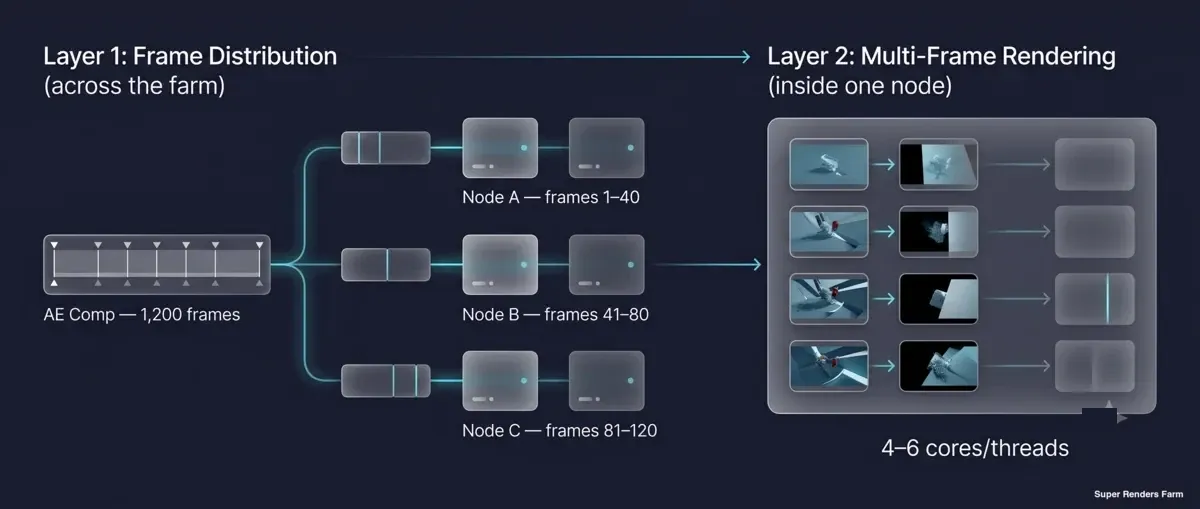 Two layers of parallelism: After Effects multi-frame rendering inside one node, and frame distribution across many render farm nodes
What "After Effects 2025" Actually Means for a Render Farm
"After Effects 2025" isn't a single build — it's the 25.x family that shipped in stages across the year: 25.2 in April 2025, 25.4 in August, 25.5 in September, and 25.6 in November. For a render farm, only a handful of those changes are render-relevant, and it helps to separate the ones that affect a headless node from the ones that only affect the artist's interactive session.
The change that matters most is Multi-Frame Rendering (MFR), the engine that lets a single machine render several frames at once across its CPU cores. MFR has been maturing since 2022, and the 25.x line continues to lean on it as the primary way After Effects uses modern multi-core hardware. The 2025 cycle also brought color-pipeline work that's quietly important for distributed jobs: 25.4 added HDR color-consistency handling, and 25.5 added CICP metadata for color compatibility. When frames are rendered across many machines and reassembled into one sequence, consistent color management is what keeps frame 40 from looking subtly different than frame 41.
Other 2025 headline features are less relevant to a farm. The "High Performance Preview Playback" rework in 25.2 improved interactive cache behavior and timeline scrubbing — useful at the desk, irrelevant to a node that never draws a UI. The same goes for the 3D toolset additions (FBX import, multi-layer gizmos): authoring features, not render-distribution features. Our nodes keep the current After Effects line (2024–2026) installed, which means the version you author in and the version a node renders in can be matched — a detail that turns out to matter more than any single new feature.
Multi-Frame Rendering vs Frame Distribution: Two Layers of Parallelism
People often assume a render farm is just "a really big computer," and that intuition leads them astray with After Effects. There are actually two distinct kinds of parallelism in play, and they stack on top of each other.
The first layer is Multi-Frame Rendering inside a single machine. MFR spins up multiple frame-renders simultaneously across the CPU cores on one node, auto-adjusting how much work each core takes. The second layer is frame distribution across the farm. The full frame range — say, 1,200 frames of a motion-graphics sequence — is sliced into chunks and handed to many nodes at once, each of which then runs its own MFR internally.
Here's the honest nuance most "more cores is better" advice skips: MFR scales sub-linearly. Per-core efficiency drops as core count climbs, so a single 64-core machine does not give you 64× the throughput of a single core — the returns taper off well before that. This is precisely why a farm built from many well-matched machines, each running MFR on a sensible core count and each rendering a slice of the timeline, beats the fantasy of one enormous box. Our CPU fleet is built on dual Intel Xeon E5-2699 V4 nodes — over 20,000 CPU cores in aggregate — and the throughput comes from spreading the timeline across that fleet, not from any one node being heroic. For a 1,200-frame comp, the wall-clock time is closer to "one chunk on one node" than "all 1,200 frames in series," which is the entire point of putting After Effects on a farm.
How After Effects Renders on a Distributed Farm
This is where After Effects departs sharply from the 3D engines. Maya and 3ds Max ship dedicated batch or network-render licenses designed for farm use. After Effects has no built-in concurrent network-render license model in that sense. There is no "render slave" seat you buy by the dozen. Instead, farms render After Effects by slicing the frame range and assigning chunks to nodes, with each node running its own headless instance of the application.
The mechanism is aerender, the command-line binary that ships with After Effects. It opens an .aep, renders the Render Queue items for a given frame range, writes the results to disk, and never draws a graphical interface. Adobe also provides a render-only mode that doesn't require Creative Cloud serialization or signing into an Adobe account on each node — historically this was the "AE render engine" install. The practical consequence is that the After Effects application itself is free to run as a render node; the cost and complexity move entirely onto third-party plugins, which we'll get to next. On our farm, the scheduler hands each node a frame range and aerender does the work — you never remote into a machine to launch a render manually.
The single most consequential decision in this whole pipeline is your output format. Image sequences (EXR, PNG, TIFF) write one independent file per frame, which means frames can render in parallel on different nodes, a failed frame can be re-rendered on its own, and progress is trackable frame by frame. A single MP4, H.264, HEVC, or ProRes file is the opposite: those codecs use inter-frame compression or single-container encoding, so the output cannot be split across machines — it collapses the whole job onto one node, rendering frames in series. The farm-friendly workflow is to render an image sequence distributed across the fleet, then transcode that sequence to your final deliverable as a separate, single-machine finishing step. Adobe documents the broader network-rendering mechanics in its automated rendering and network rendering reference, and the frame-sequence approach is the foundation of all of it.
The Plugin Problem: Why Every Node Needs the Same Stack
Here is the structural reason After Effects farms are harder to operate than 3D-engine farms. After Effects loads effects at render time from the plugins installed on the machine. If a node is missing a plugin that a comp uses, the render either fails outright or silently drops the effect — and a silently dropped effect is the worse outcome, because it produces a "successful" render that's wrong. Adobe's own guidance is blunt about this: if a composition uses a plugin from another manufacturer, that plugin must be present on every computer that renders, and network-rendering support varies by plugin maker.
So every node in the farm needs an identical plugin set, matching versions, and a valid per-machine license for each commercial plugin. For a do-it-yourself or remote-desktop (IaaS) setup, this is the real labor of running After Effects at scale: installing each plugin on every node, activating its license per machine, and keeping versions pinned so a comp authored against one release doesn't hit a node running another. It's tedious, it's easy to get subtly wrong, and it's the most common reason a farm render diverges from a local one.
This is exactly the work our fully managed model absorbs. On the After Effects render farm you don't remote in to install or activate anything. Third-party plugins are set up on request rather than pre-installed, so tell support which ones your comp uses before you submit and we confirm what can be prepared for your job. It's worth noting that not every cloud farm still invests in this: some providers have narrowed their focus to pure 3D-engine rendering and deprecated After Effects support entirely, which is a meaningful consideration if your pipeline leans on motion graphics or compositing-heavy comps.
After Effects Plugin Support Matrix on the Farm
The plugins below are the set our After Effects nodes carry. The table notes each vendor, what the plugin does, how it leans on hardware, and the practical caveat that matters when it renders across a distributed fleet.
| Plugin | Vendor | What it does | Acceleration | Farm note |
|---|---|---|---|---|
| Element 3D | Video Copilot | Real-time 3D object import, extrusion, and particle replication inside After Effects | GPU (OpenGL) | Strong OpenGL dependency — needs a consistent GPU and driver environment across nodes to render predictably |
| Trapcode Suite | Red Giant | 3D particle systems and organic motion (Particular, Form, Mir, Tao) | GPU-accelerated | Heavy particle comps benefit from VRAM headroom; version pinning matters across releases |
| Red Giant Universe | Red Giant | Library of effects and transitions for motion design and editing | GPU-accelerated | All-GPU effect set; consistent across nodes once installed |
| Optical Flares | Video Copilot | Lens-flare design and animation, integrates with AE 3D lights | GPU (OpenGL), 32-bpc | Lighter than Element 3D but shares the OpenGL-context requirement |
| Sapphire | Boris FX | 270+ VFX effects and transitions (glows, lighting, stylize) | GPU-accelerated | Checks for a valid license at launch — handled per node on a managed fleet |
| Magic Bullet Suite | Red Giant | Color correction and film looks (Looks, Colorista, Denoiser, Mojo) | GPU-accelerated | Fully GPU-accelerated; color tools make node-to-node color consistency important |
| Stardust | Superluminal | Node-based 3D particle and volumetric system, VDB import | GPU (OpenGL 3.3+ for 3D) | 3D-model and volume paths need GPU; benefits from matched hardware |
| Plexus | Rowbyte | Procedural particle and geometry engine, data-visualization meshes | GPU-accelerated (hybrid) | Procedural geometry scales with scene complexity; pin versions per project |
A theme runs through that whole table: every one of these plugins touches the GPU, and several — Element 3D, Stardust's 3D paths, Optical Flares — lean on OpenGL contexts that behave differently across mismatched hardware and drivers. That variability is the root cause of frame-to-frame inconsistency when a comp is split across nodes that aren't identical. The practical answer to "why did frame 41 look different than frame 40" is to render every frame of a comp on identically configured nodes. On our farm, After Effects jobs render on CPU nodes, and the plugins above are set up on request, so contact support before you submit a comp that uses any of them: we install a plugin when its license allows render-node use, but that isn't guaranteed, and if it can't be installed the effect needs to be pre-rendered or swapped before submission.
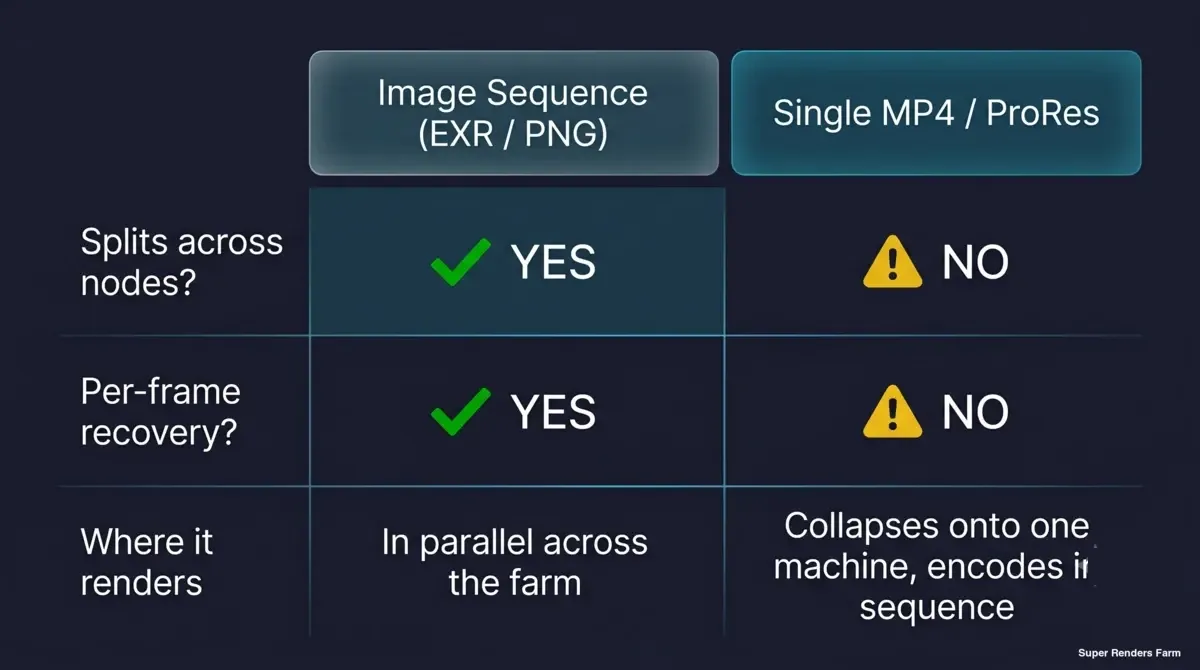 Comparison: image sequence output distributes across render farm nodes, while a single MP4 collapses onto one machine
A Comp Render Workflow, Start to Finish
Putting the pieces together, here's the workflow we see work reliably for an After Effects 2025 comp on the farm.
- Pre-flight the project in After Effects. Run File > Dependencies > Collect Files to package the
.aepwith all of its footage and assets using relative paths. This is the single most important prep step — it's what prevents the "missing footage / placeholder color blocks" problem on nodes that don't share your local drive layout. Confirm fonts are accounted for and that every effect in the comp is from the supported plugin set — or, for a plugin outside it, that support has confirmed it's installed before you submit. - Set the output module to an image sequence. Choose EXR or PNG, not MP4 or ProRes, so the job can distribute. You'll transcode to a final video container later.
- Upload the project. Upload the collected folder unpacked; the farm does not extract archives (.zip, .rar, .7z, .tar, .tar.gz), so nothing inside an archive gets rendered. Web upload suits smaller projects, but a single browser upload gets slow above roughly 2 GB, becomes unreliable above about 5 GB and does not resume if the tab closes; above 2 GB, the client app gives you resumable transfers, or you can use S3 access (Cloud Direct Connect).
- Submit the job. The farm analyzes the project, then slices the frame range and distributes chunks across nodes. Each node runs
aerenderheadless with MFR active internally. - Render and retrieve. As chunks finish, the image sequence assembles into your output location. Because frames are independent files, any individual frame that needs a re-render can be reprocessed without redoing the batch.
- Transcode to the deliverable. Take the finished image sequence and encode it to ProRes, H.264, or whatever your delivery spec requires as a single finishing pass — locally or via Adobe Media Encoder.
One operational detail worth planning around: rendered output stays on the farm for you to download, with no fixed automatic deletion period, so download your sequence promptly or configure the client app to pull it to local storage automatically.
Where After Effects Renders Actually Spend Their Time
A common over-spend with After Effects is assuming it's a GPU-first workload because the flashy plugins are GPU-accelerated. In practice, the comp itself — layer compositing, expressions, transforms, and the many effects that run on the CPU — is a CPU-core-driven job, which is exactly what Multi-Frame Rendering is built to exploit. The GPU matters for the GPU-accelerated effects (the plugins in the matrix above, plus After Effects' own GPU-accelerated effects like Lumetri Color, Gaussian Blur, and Turbulent Displace), but for a typical motion-graphics or title-sequence comp, the bulk of the time is CPU.
That's why we present CPU capacity first for After Effects work and treat the GPU fleet as the accelerator for the specific effects that need it, rather than the default. The honest planning advice is to not over-provision GPU for a comp that's mostly CPU effects — it won't render faster, it'll just cost more. We bill rendering by the GHz-hour of compute actually used rather than a flat monthly seat, and the current rates and worked examples live on the pricing page; new accounts get a small credit to test a real comp end-to-end before committing, and render credits don't expire.
Common After Effects Farm-Rendering Pitfalls
Most failed or "wrong" After Effects farm renders trace back to a short list of causes. Here's what we see, why it happens, and how a managed environment addresses each.
| Pitfall | Why it happens | How a managed farm handles it |
|---|---|---|
| Missing fonts | Fonts aren't embedded in the .aep; a node without the font substitutes or renders wrong text | Package fonts with the project; the farm renders against a consistent environment |
| Missing plugins or effects | A node lacking a plugin fails the render or silently drops the effect | Third-party plugins are set up on request; confirm with support before you submit |
| Broken asset paths | A node can't see your local drive paths, so footage relinks to nothing | Collect Files before upload bundles assets with relative paths |
| Color shifts between frames | Working space, OCIO config, or HDR/CICP metadata differ across nodes | Color management stays consistent across a uniform fleet |
| Job won't parallelize | Output set to MP4/ProRes forces single-machine sequential encoding | Render an image sequence; transcode to video as a separate finishing step |
| Frame-to-frame GPU differences | GPU-accelerated effects render differently on mismatched cards or drivers | A homogeneous GPU fleet with pinned drivers keeps results deterministic |
The pattern across that table is consistency: nearly every After Effects farm problem is really an environment-mismatch problem, and the value of a managed farm is that the environment doesn't drift from node to node. You prepare the project correctly once, and the fleet behaves the same way every time.
FAQ
Q: Does Super Renders Farm support After Effects 2025? A: Yes. Our nodes keep the current After Effects line (2024–2026) installed, which covers the 2025 (25.x) release family. Matching the version you author in to the version a node renders in is part of how we keep farm renders consistent with your local results.
Q: Do I need to install my After Effects plugins on the farm myself? A: No. You never remote into a machine to install or activate anything. Third-party plugins are set up on request, so send support the list your project uses before you submit, and we confirm which ones can be prepared for your job.
Q: Which After Effects plugins are available on the farm? A: The plugins we set up on request are Element 3D, Trapcode Suite, Red Giant Universe, Optical Flares, Sapphire, Magic Bullet Suite, Stardust, and Plexus. For a plugin outside that list, contact support before submitting: we install it on request when its license allows render-node use, but that isn't guaranteed. If it can't be installed, the effect needs to be pre-rendered or swapped before submission, since every node must have the plugin to render it.
Q: Why should I render an image sequence instead of an MP4 on a render farm? A: Image sequences (EXR, PNG, TIFF) write one independent file per frame, so frames distribute across many nodes and any single frame can be re-rendered on its own. A single MP4 or ProRes file uses single-machine encoding that can't be split, which collapses the job onto one node. Render the sequence distributed, then transcode to your final video as a separate step.
Q: How does multi-frame rendering work with a render farm? A: They stack into two layers. Multi-Frame Rendering parallelizes frames across CPU cores within one machine, while the farm distributes the overall frame range across many machines. Because MFR scales sub-linearly past a point, spreading the timeline across many well-matched nodes is more effective than relying on one very-high-core machine.
Q: Can I render GPU-accelerated effects like Element 3D or Sapphire on the farm? A: Contact support before you submit. Element 3D and Sapphire are set up on request rather than pre-installed, and After Effects jobs on our farm render on CPU nodes. Element 3D in particular depends on the GPU and OpenGL, so support will tell you whether a comp can be rendered as it is or whether that layer should be pre-rendered first.
Q: Do I need my own Adobe license to render After Effects on the farm? A: After Effects includes a render-only mode that runs on a render node without per-node Creative Cloud sign-in, so the application side is handled. You still author your project under your own Adobe subscription; the farm renders the project you submit.
Q: How long are my rendered files kept on the farm? A: Rendered output stays available for download after job completion; there is no fixed automatic deletion period, and you can ask us to delete a project at any time. Download your image sequence promptly, or set the client app to auto-download finished renders to local storage.
About Alice Harper
Blender and V-Ray specialist. Passionate about optimizing render workflows, sharing tips, and educating the 3D community to achieve photorealistic results faster.



