

Render Farm Quản Lý Toàn Bộ vs. DIY: Bạn Thực Sự Đang Chọn Cái Gì
Tổng quan
Giới thiệu
Có một câu hỏi luôn xuất hiện trong gần như mỗi cuộc trò chuyện đầu tiên chúng tôi có với một studio mới: "Tại sao tôi không đơn giản chỉ thuê GPU và render tự mình?"
Đó là một câu hỏi hợp lý. Giá thuê các bộ GPU trên đám mây đã rẻ hơn rất nhiều. AWS, Google Cloud, và Azure đều cung cấp các máy tính có GPU NVIDIA mà bạn có thể bật lên trong vòng vài phút. Các dịch vụ như AWS Deadline Cloud hứa hẹn cơ sở hạ tầng render farm quản lý. Và sau đó, có những render farm IaaS cung cấp cho bạn remote desktop với phần mềm DCC được cài đặt sẵn — về cơ bản là một trạm làm việc được thuê trên đám mây.
Vậy tại sao bất kỳ ai lại chịu trả tiền cho một render farm quản lý toàn bộ khi bạn về mặt lý thuyết có thể tự làm?
Chúng tôi đã vận hành một dịch vụ kết xuất quản lý toàn bộ từ năm 2010 — rất lâu trước khi "kết xuất đám mây" trở thành một danh mục mà ai đó tiếp thị. Trong thời gian đó, chúng tôi đã chứng kiến các studio thử mọi cách tiếp cận: GPU cloud bare-metal, nền tảng cơ sở hạ tầng quản lý, dịch vụ render remote-desktop, và các render farm quản lý toàn bộ như của chúng tôi. Mô hình xuất hiện không phải về tùy chọn nào có mức giá thấp nhất trên một giờ GPU. Nó liên quan đến nơi thời gian của studio bạn thực sự đi.
Bài viết này phân tích những khác biệt thực tế giữa các cách tiếp cận này — không phải phiên bản tiếp thị, mà những gì thực sự xảy ra khi bạn đang kết xuất 3.000 frame vào lúc 2 giờ sáng thứ năm trước một deadline của khách hàng.
Bốn mô hình của kết xuất trên đám mây
Trước khi so sánh, nên hiểu rõ ý nghĩa thực tế của mỗi mô hình, vì thuật ngữ thường bị nhầm lẫn trong tài liệu tiếp thị.
1. GPU cloud thô (DIY) Bạn thuê các máy ảo có GPU từ AWS, Google Cloud, hoặc Azure. Bạn cài đặt tất cả mọi thứ: cấu hình hệ điều hành, phần mềm DCC, render engine, plugin, máy chủ giấy phép, quản lý công việc (Deadline, Tractor, v.v.), và bộ lưu trữ. Bạn quản lý toàn bộ pipeline.
2. Cơ sở hạ tầng cloud quản lý (ví dụ: AWS Deadline Cloud) Nhà cung cấp cloud xử lý một số phần của việc điều phối — xếp hàng công việc, tự động mở rộng, cung cấp máy worker — nhưng bạn vẫn phải cấu hình stack phần mềm của riêng bạn, quản lý giấy phép, và khắc phục sự cố kết xuất. Hãy coi nó là "managed DevOps cho kết xuất" hơn là "kết xuất quản lý."
3. Dịch vụ render remote desktop / IaaS Một công ty kết xuất cung cấp cho bạn truy cập remote desktop đến các máy tính có phần mềm DCC được cài đặt sẵn. Bạn kết nối qua RDP hoặc tương tự, mở scene của bạn, cấu hình cài đặt, và nhấn render. Phần cứng và phần mềm cơ sở được quản lý; quy trình kết xuất do bạn điều khiển.
4. Render farm quản lý toàn bộ Bạn tải lên tệp scene. Render farm xử lý mọi thứ: triển khai phần mềm, giấy phép, quản lý plugin, phiên bản driver, phân phối công việc, xử lý lỗi, và cung cấp kết quả. Bạn theo dõi tiến trình thông qua một bảng điều khiển. Bạn không chạm đến các render node.
Mỗi mô hình có những trường hợp sử dụng hợp lệ. Vấn đề là các studio thường chọn dựa vào giá niêm yết mà không tính đến chi phí hoạt động nằm trên đó.
Để xem chi tiết cách các dịch vụ render farm quản lý khác nhau so sánh về giá, hỗ trợ phần mềm, và thời gian quay quanh, xem so sánh thực tế các dịch vụ render farm cloud năm 2026.
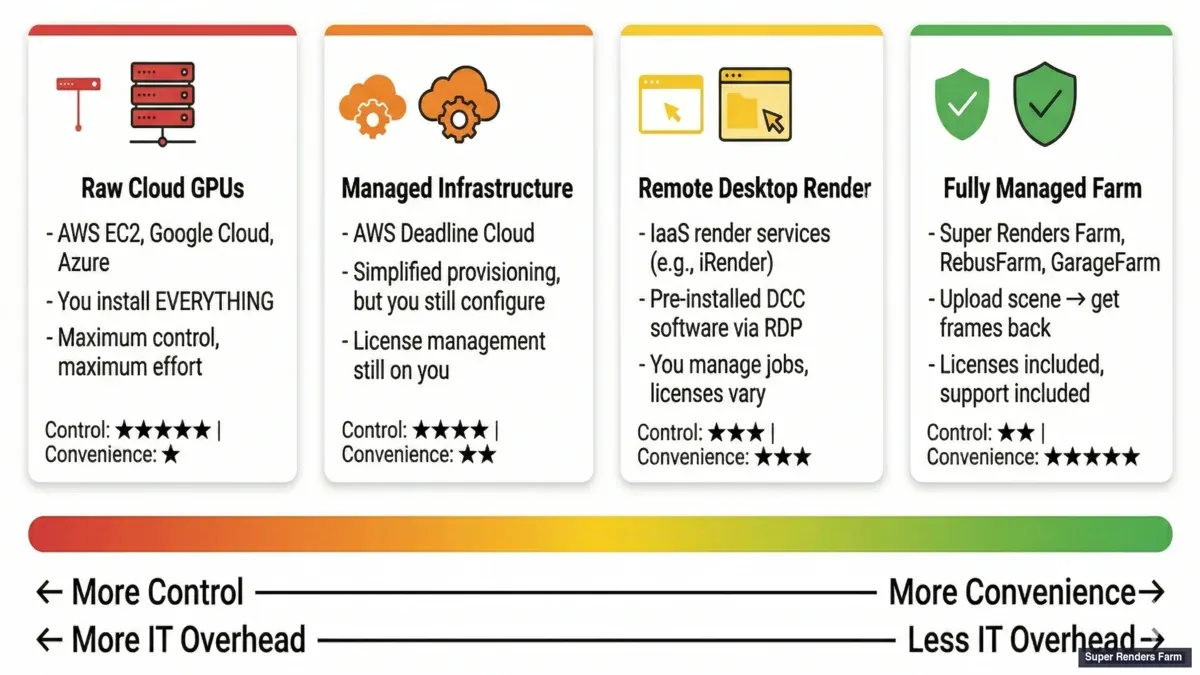 Four models of cloud rendering — raw cloud GPUs, managed infrastructure, remote desktop, and fully managed render farm
So sánh song song: Quản lý toàn bộ và DIY
Trước khi đi vào các con số chi phí, sẽ hữu ích nếu nhìn thấy hai đầu của quang phổ — một render farm quản lý toàn bộ và một thiết lập cloud DIY tự quản lý — được trình bày theo các yếu tố thực sự chi phối quyết định. (Hai mô hình ở giữa, cơ sở hạ tầng quản lý và remote desktop, thường nằm giữa hai cột này ở hầu hết các hàng.)
| Yếu tố | Quản lý toàn bộ | Cloud DIY |
|---|---|---|
| Thời gian thiết lập | Khoảng 10 phút | Vài ngày đến vài tuần |
| Quản lý liên tục | Tối thiểu | Đáng kể |
| Độ phức tạp giấy phép | Render farm xử lý | Bạn tự xử lý |
| Khả năng dự đoán chi phí | Cao (giá theo frame hoặc theo công việc) | Thấp (nhiều chi phí biến đổi) |
| Đường cong học tập | Thấp | Cao |
| Khả năng tùy chỉnh | Hạn chế | Không giới hạn |
| Xung đột phụ thuộc | Hiếm | Phổ biến |
| Thời gian phản hồi hỗ trợ | Vài giờ đến khoảng một ngày | Hỗ trợ cộng đồng hoặc trả phí |
| Phù hợp nhất cho | Công việc nhất quán, lặp lại | Quy trình làm việc chuyên biệt, tùy chỉnh cao |
Không cột nào tốt hơn một cách phổ quát — bảng này thể hiện một sự đánh đổi, không phải một bảng xếp hạng. Phần còn lại của hướng dẫn này sẽ đưa ra các con số cụ thể đằng sau từng hàng.
Chi phí ẩn không xuất hiện trên hóa đơn
Đây là những gì chúng tôi quan sát thấy trong 15 năm theo dõi các studio chuyển đổi giữa các mô hình kết xuất:
Mức giá GPU-giờ không bao giờ là chi phí thực tế. Chi phí thực tế là: GPU-giờ × mức giá + (giờ nhân viên dành cho cơ sở hạ tầng × mức lương giờ của nhân viên).
Một nghệ sĩ 3D cao cấp tại một studio vừa và nhỏ thường có chi phí từ 40 đến 80 USD mỗi giờ, tính toàn bộ. Một giám đốc kỹ thuật có chi phí cao hơn. Khi người đó dành bốn giờ để gỡ lỗi một driver mismatch trên remote desktop, hoặc ba giờ để cấu hình Deadline worker trên AWS, hoặc hai giờ để tìm ra tại sao máy chủ giấy phép V-Ray của họ không nhìn thấy được từ cloud instance — đó là tiền thực tế không bao giờ xuất hiện trên hóa đơn điện toán đám mây.
Chúng tôi đã thấy mô hình này lặp đi lặp lại:
Một studio chuyển sang GPU cloud thô vì mức giá trên một giờ rẻ hơn 30-40% so với một render farm quản lý.
Phân tích chi phí này áp dụng trực tiếp cho kết xuất cụ thể trên đám mây. Khi đánh giá các nền tảng cloud, việc hiểu rõ chi phí hoạt động thực tế là rất quan trọng — khám phá hướng dẫn toàn diện về các render farm cloud tốt nhất cho archviz cho những trường hợp sử dụng trực quan kiến trúc.
Ba tháng sau, họ đã cháy đủ giờ nhân viên trên các tác vụ cơ sở hạ tầng để chi phí hiệu quả trên một frame cao hơn so với tùy chọn quản lý. Tiền tiết kiệm trong điện toán được tiêu thụ bởi chi phí trong hoạt động. Để hiểu rõ toàn bộ bức tranh kinh tế, đọc phân tích chi tiết về chi phí xây dựng so với cloud.
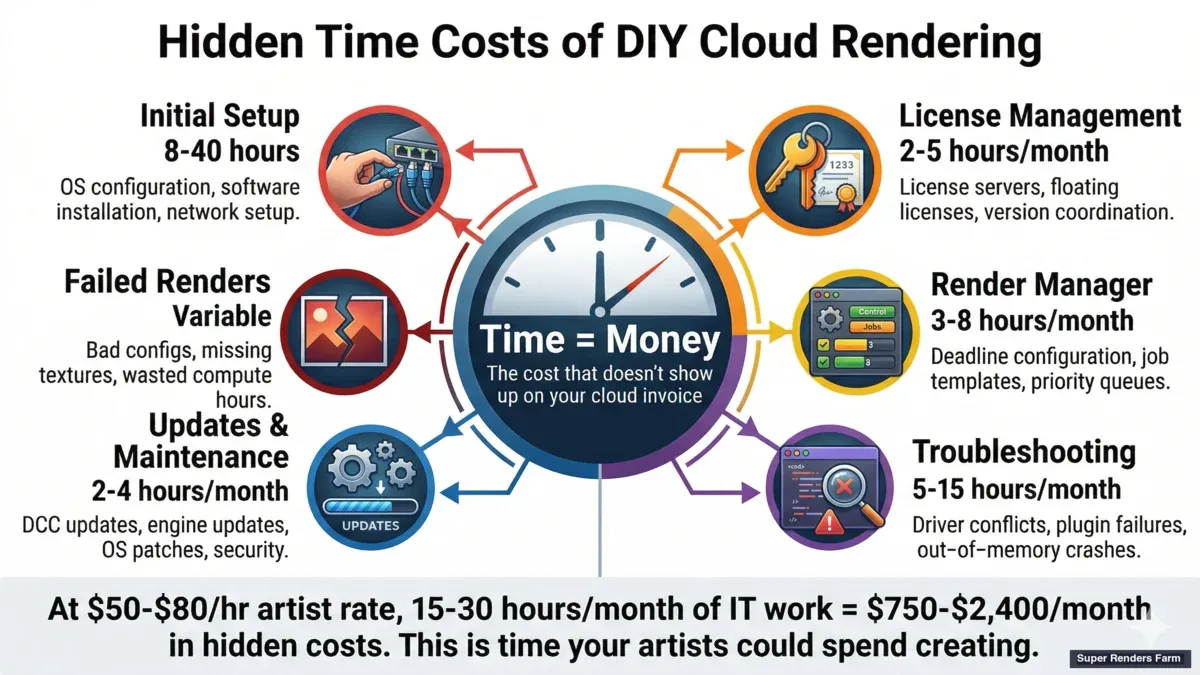 Hidden costs of DIY cloud rendering — time spent on setup, licensing, troubleshooting, and failed renders
Điều này không phổ biến. Các studio có những người "render wrangler" hoặc pipeline TD chuyên dụng — những người có công việc là quản lý cơ sở hạ tầng kết xuất — hoàn toàn có thể chạy kết xuất cloud riêng của họ một cách hiệu quả về chi phí. Nhưng đối với các studio nơi những người tạo ra công việc cũng quản lý pipeline kết xuất, kinh tế học thường không hoạt động.
Kinh tế học thực tế: Tổng chi phí so với mức giá theo giờ
Phần trước đã đưa ra lập luận định tính; đây là những con số cụ thể đằng sau nó. Sai lầm phổ biến là so sánh giá theo core hoặc theo giờ thay vì tổng chi phí. Các con số dưới đây là ước tính điển hình của ngành để minh họa — không phải báo giá từ bất kỳ render farm cụ thể nào — nhưng chúng cho thấy hai mô hình này thường cộng dồn như thế nào.
Mô hình chi phí quản lý toàn bộ. Các render farm quản lý thường tính giá theo frame hoặc theo công việc thay vì theo giờ. Theo một chuẩn tham khảo chung của ngành, một frame archviz HD thường rơi vào khoảng 0,40–1,20 USD mỗi frame tùy theo chất lượng và độ phức tạp, đưa một chuỗi hoạt ảnh 2.000 frame lên khoảng 800–2.400 USD tổng cộng. Vì giá được báo theo frame hoặc theo công việc, số tiền đã biết trước khi công việc chạy, và tính toán, giấy phép, bộ lưu trữ, và thời gian rảnh đều được gộp vào con số duy nhất đó thay vì tính riêng từng mục.
Mô hình chi phí cloud DIY. Thoạt nhìn, DIY có vẻ rẻ — các instance GPU cloud thô thường được báo giá 2–4 USD mỗi giờ — nhưng dòng chi phí tính toán chỉ là một yếu tố đầu vào. Bức tranh đầy đủ thường bao gồm:
- Chi phí giấy phép. Các render engine và ứng dụng DCC thương mại thường cấp phép theo node; một giấy phép render engine cho một node thường dao động từ vài trăm USD đến khoảng 1.500 USD mỗi năm (chi tiết theo từng node ở phần tiếp theo). Bật lên mười node và chỉ riêng chi phí giấy phép cũng có thể lên tới năm chữ số (hàng chục nghìn USD) mỗi năm.
- Cơ sở hạ tầng. Tính toán khoảng 2–6 USD mỗi giờ cho mỗi node, cộng với bộ lưu trữ, cộng với truyền dữ liệu — egress có thể tốn khoảng 0,09–0,20 USD mỗi GB.
- Trình quản lý render (render manager). Một trình quản lý render phân tán có chi phí riêng (ví dụ, khoảng 0,005 USD mỗi core-giờ), tích lũy dần trên nhiều node.
- Chi phí vận hành DevOps. Ai đó phải theo dõi, cập nhật, khắc phục sự cố, và tối ưu hóa thiết lập — thường từ 5–15 giờ mỗi tháng ngay cả với một triển khai nhỏ.
- Render bị lỗi. Cấu hình sai, sự cố phụ thuộc, và driver mismatch đốt giờ tính toán mà không mang lại kết quả gì.
Để làm cho so sánh cụ thể hơn, hãy xem xét một công việc 2.000 frame render trên cơ sở hạ tầng DIY:
- Ước tính: 10 node × 10 giờ = 100 node-giờ
- Tính toán: 100 × 3 USD = 300 USD
- Giấy phép (phân bổ cho công việc này): khoảng 200 USD
- Bộ lưu trữ và truyền dữ liệu: khoảng 50 USD
- Thời gian DevOps: 2 giờ × 50 USD/giờ (mức giá minh họa, nằm trong khoảng 40–80 USD đã nêu ở trên) = 100 USD
- Render lỗi và thử lại: khoảng 50 USD
- Tổng ước tính: 700 USD
So với mức 800–2.400 USD mà một render farm quản lý có thể tính cho cùng một chuỗi, cột DIY có thể trông thấp hơn trên giấy tờ — nhưng 700 USD đó cũng đã tiêu tốn khoảng hai giờ thời gian của một thành viên trong đội, và nó giả định rằng thiết lập đã sẵn có từ trước. DIY có thể chiếm ưu thế khi studio có một người phụ trách cơ sở hạ tầng chuyên trách; đối với một studio nhỏ không có người như vậy, tổng chi phí quản lý thường là con số thực tế thấp hơn một khi thời gian đó được tính vào.
Quản lý giấy phép: Chi phí theo node và cái bẫy floating-license
Giấy phép là một trong những khoản chi phí ẩn lớn nhất trong một thiết lập DIY, và đáng để tách riêng ra để phân tích.
Trên một render farm quản lý toàn bộ, render farm sở hữu giấy phép render engine và ứng dụng. Người dùng không cần cấu hình giấy phép theo ghế, giấy phép render-node, hay một máy chủ floating-license — giấy phép đã được gộp vào giá theo frame, nên không có chi phí giấy phép riêng theo node ở phía người dùng.
Trong một thiết lập DIY, mỗi node đều cần giấy phép riêng, và các con số theo node này cộng dồn rất nhanh. Theo mức giá niêm yết điển hình của ngành (mang tính minh họa, không phải báo giá):
- Corona: khoảng 500 USD mỗi năm cho mỗi node
- V-Ray: khoảng 1.500 USD mỗi năm cho mỗi node (nếu chưa sở hữu sẵn)
- 3ds Max hoặc Cinema 4D: khoảng 600+ USD mỗi năm cho mỗi node (trừ khi đã sở hữu sẵn)
Chi phí chỉ là một nửa vấn đề — nửa còn lại là độ phức tạp. Floating license trên một mạng nội bộ thì đơn giản; floating license trên các node cloud thì không. Bạn phải dựng một máy chủ giấy phép trên cloud, bảo mật nó, theo dõi nó, và đảm bảo mọi render node cũng như ứng dụng on-premise đều có thể kết nối tới nó. Nếu máy chủ giấy phép đó không thể truy cập được, các render sẽ thất bại. Trong thực tế, các studio nhỏ có xu hướng mua dư giấy phép "để phòng hờ," hoặc mất công việc khi máy chủ giấy phép gặp sự cố — một điểm lỗi duy nhất mà mô hình quản lý toàn bộ loại bỏ hoàn toàn.
Một ví dụ thực tế: Một studio archviz nhỏ
Để làm rõ sự đánh đổi này qua một quyết định cụ thể, hãy xem xét một trường hợp thực tế: một studio archviz gồm năm người, render các dự án 3ds Max và V-Ray.
Hiện trạng. Đội đang render cục bộ. Một hoạt ảnh 2.000 frame chiếm dụng workstation của họ trong khoảng 12 giờ và chặn các công việc khác trong khi chạy.
Phương án A — render farm quản lý toàn bộ.
- Tuần 1: tải lên công việc đầu tiên, nhận lại frame trong khoảng 2 giờ
- Chi phí: khoảng 1.500 USD cho công việc này (con số điển hình của render farm quản lý cho một chuỗi kích thước này, không phải báo giá cụ thể)
- Liên tục: submit công việc qua giao diện web hoặc plugin, nhận kết quả vào ngày hôm sau
- Không có cơ sở hạ tầng nào cần quản lý, và không có chi phí giấy phép ngoài phần mềm studio đã sở hữu sẵn
- Đội học cách sử dụng hệ thống trong khoảng một ngày
Phương án B — Cloud DIY (ví dụ: AWS Deadline Cloud).
- Tuần 1–2: thiết lập tài khoản cloud, chọn loại instance, cài đặt và cấu hình trình quản lý render cùng giấy phép
- Chi phí: khoảng 400 USD tính toán cộng khoảng 200 USD giấy phép V-Ray cho công việc này
- Liên tục: một người trong đội phải phụ trách cơ sở hạ tầng — theo dõi chi phí, vá lỗi, và khắc phục sự cố
- Lần render đầu tiên có thể thất bại do cấu hình sai; lần thử thứ hai thành công
- Đường cong học tập: khoảng 40–80 giờ trải dài trong tháng đầu tiên
Trong kịch bản này, phương án quản lý toàn bộ tránh được khoảng 40–80 giờ thiết lập và 5–10 giờ mỗi tháng cho việc quản lý liên tục — tương đương khoảng 2.000–4.000 USD mỗi tháng thời gian nghệ sĩ được thu hồi lại, theo các mức giá đã dùng ở trên. Một công việc có giá khoảng 1.500 USD trên render farm quản lý so với khoảng 600 USD chi phí tính toán và giấy phép DIY trông có vẻ thấp hơn ở cột DIY cho đến khi khoản thời gian thu hồi đó được cộng ngược trở lại; đối với một studio không có người phụ trách cơ sở hạ tầng chuyên trách, tổng chi phí thường hội tụ lại gần nhau hoặc đảo ngược. Đây chính xác là động lực điểm hòa vốn (break-even) mà phần còn lại của hướng dẫn này mô tả: chi phí đơn vị của DIY thắng thế ở quy mô lớn và khi có nhân sự chuyên trách, trong khi quản lý toàn bộ thắng thế khi thời gian của nghệ sĩ là nguồn lực khan hiếm.
AWS Deadline Cloud: Cơ sở hạ tầng quản lý ≠ Kết xuất quản lý
AWS Deadline Cloud xứng đáng được thảo luận cụ thể vì nó xuất hiện nổi bật khi mọi người tìm kiếm render farm quản lý, và sự phân biệt giữa những gì nó quản lý và những gì nó không quản lý rất quan trọng.
Deadline Cloud xử lý điều phối công việc: nó cung cấp các instance EC2, phân phối các tác vụ render, mở rộng máy worker lên và xuống, và quản lý hàng đợi. Đây là thứ giá trị thực sự — thiết lập Deadline trên cơ sở hạ tầng AWS riêng của bạn là một dự án kéo dài nhiều ngày liên quan đến vai trò IAM, cấu hình VPC, chính sách bộ lưu trữ S3, và các nhóm tự động mở rộng.
Những gì Deadline Cloud không quản lý:
Giấy phép phần mềm. Bạn cần giấy phép riêng của bạn cho ứng dụng DCC (Maya, 3ds Max, Cinema 4D, Houdini) và render engine của bạn (V-Ray, Arnold, Redshift, v.v.). Đối với Redshift, điều đó có nghĩa là mua giấy phép render node riêng biệt từ đăng ký trạm làm việc. Đối với V-Ray, bạn cần các giấy phép DR (Kết xuất phân tán) — chúng tôi đã bao gồm bối cảnh giấy phép V-Ray chi tiết trong một hướng dẫn riêng. Quản lý máy chủ giấy phép floating trên cloud tăng thêm một lớp cấu hình khác.
Khả năng tương thích plugin. Nếu scene của bạn sử dụng X-Particles, Forest Pack, Scatter, TyFlow, hoặc bất kỳ plugin của bên thứ ba nào, bạn cần xây dựng một AMI tùy chỉnh (Amazon Machine Image) với các plugin đó được cài đặt, cấp phép, và khớp phiên bản với phần mềm DCC của bạn. Khi một plugin cập nhật, bạn xây dựng lại AMI.
Quản lý driver. Kết xuất GPU yêu cầu các phiên bản driver NVIDIA cụ thể. Redshift 3.6 có thể cần một driver khác với Redshift 3.5. Bạn quản lý những phụ thuộc này trong cấu hình AMI.
Khắc phục sự cố. Khi frame 847 trong số 3.000 render thành đen vì sự cố texture path, bạn đang chẩn đoán nó. AWS support có thể cho bạn biết liệu một instance EC2 có khoẻ mạnh; họ không thể cho bạn biết tại sao bản đồ displacement V-Ray của bạn không tải được.
Quản lý chi phí. Các instance EC2 GPU tính theo giây, nghe có vẻ hiệu quả cho đến khi một công việc được cấu hình sai chạy 200 instance trong sáu giờ kết xuất góc camera sai. Chúng tôi đã nghe từ các studio nhận được hóa đơn đột ngột trong phạm vi bốn chữ số từ một submission công việc xấu.
Không có gì làm cho Deadline Cloud trở thành một sản phẩm tồi tệ. Nó là một công cụ mạnh mẽ dành cho các studio có nhân viên kỹ thuật để vận hành. Ý tưởng là "quản lý" trong bối cảnh AWS có nghĩa là cơ sở hạ tầng quản lý, không phải kết xuất quản lý. Chuyên môn kết xuất vẫn cần phải đến từ đội của bạn.
Dịch vụ render remote desktop: Giữa có mặt đất
Các dịch vụ remote desktop chiếm một vị trí thú vị. Phần cứng được quản lý, phần mềm được cài đặt sẵn, và bạn có được một môi trường desktop Windows quen thuộc. Đối với một số quy trình làm việc, đây là lựa chọn đúng.
Nơi remote desktop hoạt động tốt: các studio có quy trình làm việc phức tạp, không chuẩn yêu cầu can thiệp thủ công trong quá trình kết xuất. Nếu bạn cần chạy một tập lệnh Python tùy chỉnh giữa các lần render, điều chỉnh thủ công các cài đặt bộ nhớ cache mô phỏng Houdini, hoặc sử dụng các công cụ độc quyền không thể tự động hóa — remote desktop cung cấp cho bạn quyền kiểm soát để làm điều đó.
Nơi remote desktop suy yếu: thông suất và khả năng mở rộng. Bạn bị giới hạn bởi số lượng phiên remote mà bạn có thể quản lý đồng thời. Kết xuất một hoạt ảnh gồm 3.000 frame trên remote desktop có nghĩa là chăm sóc một phiên — kiểm tra lỗi, khởi động lại các frame bị lỗi, quản lý tệp đầu ra. Lúc 2 giờ sáng.
Ngoài ra còn có một nuance giấy phép mà ai cũng không thấy. Trên một remote desktop, bạn đang chạy giấy phép DCC riêng của bạn trên máy remote. Điều đó có nghĩa là một trong những ghế giấy phép của bạn bị tiêu thụ bởi phiên cloud. Nếu bạn có một số ghế nhỏ, các nghệ sĩ địa phương của bạn có thể bị khóa trong khi máy cloud đang render.
Mức giá trên một giờ cho các dịch vụ remote desktop thường trông cạnh tranh, nhưng tính vào thời gian giám sát thủ công và tiêu thụ ghế giấy phép, và chi phí hiệu quả tăng lên.
Quản lý toàn bộ: Điều nó thực sự có nghĩa trong thực tế
Trên một render farm quản lý toàn bộ, đây là những gì xảy ra khi bạn submit một công việc Cinema 4D + Redshift, ví dụ:
- Bạn tải lên dự án .c4d được đóng gói (scene + texture + proxy).
- Hệ thống của render farm xác định các phiên bản phần mềm cần thiết: Cinema 4D 2025.2, Redshift 3.6.05, X-Particles 2024.
- Các render node được gán với phần mềm chính xác, plugin, và driver GPU đã được cấu hình.
- Các giấy phép Redshift được cấp từ pool của render farm — không cần cấu hình giấy phép ở phía bạn.
- Công việc được phân phối trên các node có sẵn. Mỗi node kết xuất các frame được gán của nó.
- Nếu một frame bị lỗi (tràn VRAM, lỗi plugin, texture bị hỏng), hệ thống sẽ đánh dấu nó và either thử lại hoặc cảnh báo cho đội hỗ trợ.
- Các frame hoàn thành được lắp ráp và sẵn sàng để tải xuống.
- Bạn nhận được thông báo khi nó hoàn tất.
Bạn không bao giờ kết nối với một máy remote, quản lý máy chủ giấy phép, gỡ lỗi một vấn đề driver, hoặc cấu hình một job scheduler. Chuyên môn sẽ nếu không đến từ pipeline TD của bạn được cung cấp bởi đội operations của render farm.
Sự đánh đổi: bạn có ít kiểm soát hơn đối với môi trường kết xuất. Nếu bạn cần chạy một tập lệnh pre-render tùy chỉnh, hoặc sử dụng một plugin mà render farm không hỗ trợ, hoặc kết xuất với các cài đặt không chuẩn yêu cầu cấu hình node thủ công — một render farm quản lý toàn bộ có thể không phục vụ được. Bạn đang tối ưu hóa cho tốc độ và độ tin cậy với chi phí linh hoạt.
Quy trình làm việc thực tế của bạn: Upload, render, tải xuống
Để làm điều này cụ thể, đây là những gì trải nghiệm hàng ngày trên một render farm quản lý toàn bộ trông như thế nào — rút gọn thành ba điều bạn thực sự làm:
Tải lên. Bạn đóng gói scene của mình (3ds Max, Maya, Cinema 4D, Blender, hoặc dự án Houdini với texture và asset) và gửi nó đến render farm. Trên Super Renders Farm, điều này xảy ra thông qua một ứng dụng desktop thu thập các phụ thuộc tự động — hoặc thông qua tải web cho phần mềm không có plugin. Quá trình tải lên xử lý remapping đường dẫn texture nên bạn không cần phải manually relink bất cứ điều gì.
Chờ đợi (trong khi bạn tiếp tục làm việc). Render farm tiếp nhận: gán các máy, triển khai các phiên bản phần mềm và plugin chính xác, phân phối frame, theo dõi lỗi. Bạn theo dõi tiến trình thông qua một bảng điều khiển web. Trạm làm việc cục bộ của bạn miễn phí — bạn có thể tiếp tục tạo mô hình, chiếu sáng, hoặc làm việc trên dự án tiếp theo.
Tải xuống. Các frame được kết xuất xuất hiện trong thư mục đầu ra của bạn khi chúng hoàn tất. Bạn có thể tải xuống từng phần (kiểm tra frame khi chúng kết thúc) hoặc chờ đợi toàn bộ batch. Không quản lý tệp thủ công trên máy remote, không FTP juggling, không phiên RDP để đóng.
Đó là toàn bộ tương tác. Không remote desktop, không cấu hình máy chủ giấy phép, không gỡ lỗi driver. Đối với các studio nơi những người tạo ra công việc cũng chịu trách nhiệm cung cấp nó, quy trình tải lên và tải xuống này có nghĩa là render không bao giờ đưa bất kỳ ai ra khỏi sản xuất sáng tạo. Nếu bạn mới tìm hiểu về cloud render farm và muốn hiểu rõ bối cảnh rộng hơn trước tiên, hướng dẫn plain-English của chúng tôi về cloud render farm bao gồm những nền tảng cơ bản. Để xem hướng dẫn từng bước về việc submit công việc đầu tiên của bạn, xem hướng dẫn bắt đầu của chúng tôi.
Khi mỗi mô hình có ý nghĩa
Đây không phải là một quyết định phù hợp với tất cả. Dưới đây là một khung thực tế:
Chọn GPU cloud thô (DIY) nếu:
- Bạn có một pipeline TD hoặc render wrangler chuyên dụng trong nhân viên
- Pipeline của bạn bao gồm các công cụ tùy chỉnh không thể được đóng gói cho một render farm của bên thứ ba
- Bạn render đủ nhất quán để biện minh cho khoản đầu tư cơ sở hạ tầng
- Bạn thoải mái quản lý AMI, máy chủ giấy phép, và networking cloud
Chọn cơ sở hạ tầng quản lý (AWS Deadline Cloud) nếu:
- Bạn có một số nhân viên kỹ thuật nhưng không muốn quản lý thiết lập cloud bare-metal
- Khối lượng render của bạn đủ cao để giá Deadline Cloud có ý nghĩa
- Bạn cần tự động mở rộng nhưng muốn kiểm soát stack phần mềm
- Studio của bạn đã có cơ sở hạ tầng và chuyên môn AWS
Chọn remote desktop nếu:
- Bạn cần can thiệp thủ công trong quá trình render
- Pipeline của bạn yêu cầu công cụ tương tác không thể được batch
- Bạn đang kết xuất các scene phức tạp duy nhất (không phải chuỗi khung lớn)
- Bạn có plugin độc quyền mà chỉ bạn có thể cài đặt và cấu hình
Chọn quản lý toàn bộ nếu:
- Thời gian của các nghệ sĩ của bạn là tài nguyên hiếm nhất của bạn
- Bạn render các kết hợp DCC + render engine chuẩn (3ds Max, Maya, C4D, Houdini + V-Ray, Corona, Redshift, Arnold)
- Bạn cần mở rộng kết xuất mà không mở rộng đội kỹ thuật của bạn
- Deadline không thể thương lượng được và bạn không thể chịu được thời gian khắc phục sự cố cơ sở hạ tầng
- Bạn muốn hiểu toàn bộ kinh tế học của giá render farm
Hầu hết các studio chúng tôi làm việc với rơi vào danh mục cuối cùng.
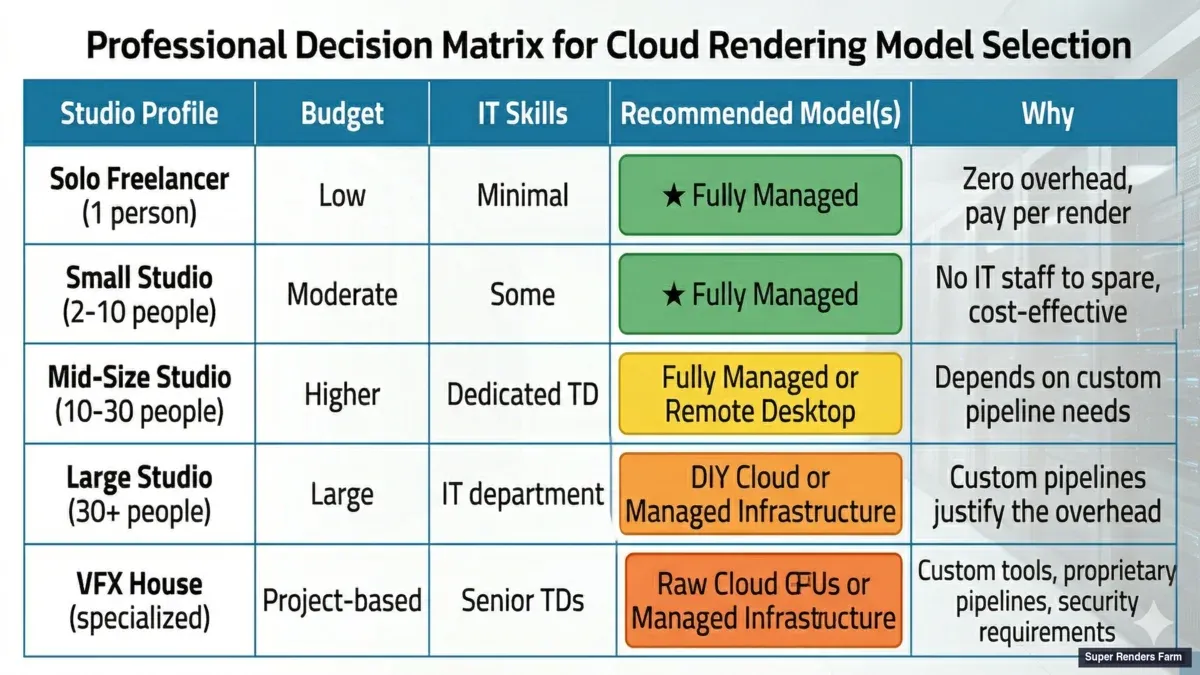 Which cloud rendering model fits your studio — decision matrix by team size, budget, and workflow complexity
Họ không chọn quản lý toàn bộ vì họ không thể tìm ra AWS — họ chọn nó vì gỡ lỗi cơ sở hạ tầng cloud lúc nửa đêm không phải là nơi họ muốn các nghệ sĩ cao cấp của họ dành thời gian.
Một lưu ý về Minh bạch giá
Một mối quan tâm phổ biến về render farm quản lý toàn bộ là sự mờ mịt về giá. Khi một render farm tính phí theo frame hoặc theo GHz-giờ, nó có thể cảm thấy như một hộp đen so với lập hóa đơn EC2 theo giây mà GPU cloud thô cung cấp.
Đây là một mối quan tâm hợp lệ, và thật đáng để hiểu những gì được gộp vào giá của một render farm quản lý: tính toán, giấy phép, bộ lưu trữ, băng thông, hỗ trợ, và chi phí hoạt động. Khi bạn so sánh điều đó với cloud thô, hãy chắc chắn bạn đang so sánh toàn bộ stack — không chỉ là mục dòng tính toán.
Một bài tập hữu ích: lấy một dự án gần đây, tính tổng giờ nhân viên dành cho các hoạt động kết xuất (không phải công việc sáng tạo — chỉ là quản lý cơ sở hạ tầng), và thêm chi phí đó vào hóa đơn điện toán cloud của bạn. Sau đó so sánh tổng đó với những gì một render farm quản lý sẽ tính phí cho cùng một công việc. Đối với các studio mà không có nhân viên render ops chuyên dụng, so sánh thường gây bất ngờ.
Để xem chi tiết cụ thể những gì render thực sự chi phí trên cơ sở per-frame trên các loại dự án khác nhau và render engine, chi tiết chi phí per-frame của chúng tôi hướng dẫn thông qua những con số thực tế cho archviz, VFX, và hoạt ảnh.
FAQ
Điều gì "quản lý toàn bộ" có nghĩa là gì cho một render farm cloud?
Một render farm quản lý toàn bộ xử lý toàn bộ pipeline kết xuất: cài đặt phần mềm, giấy phép, quản lý plugin, phân phối công việc, xử lý lỗi, và cung cấp kết quả. Bạn tải lên tệp scene và nhận được các frame được kết xuất — mà không cần cấu hình hoặc quản lý bất kỳ cơ sở hạ tầng cloud nào.
AWS Deadline Cloud có phải là một render farm quản lý toàn bộ không?
Không. AWS Deadline Cloud là cơ sở hạ tầng kết xuất quản lý — nó xử lý điều phối công việc và tự động mở rộng, nhưng bạn vẫn quản lý stack phần mềm riêng của bạn, giấy phép, plugin, và khắc phục sự cố. Nó là một công cụ DevOps cho kết xuất, không phải một dịch vụ kết xuất.
Các render farm có yêu cầu truy cập remote desktop không?
Điều đó phụ thuộc vào loại dịch vụ. Các dịch vụ thuê GPU cloud tự phục vụ (IaaS) thường yêu cầu RDP hoặc SSH để cài đặt phần mềm và chạy render trên máy remote. Các dịch vụ render kiểu remote desktop cung cấp cho bạn một phiên RDP tới một workstation cloud được cấu hình sẵn. Các render farm được quản lý toàn bộ — danh mục mà Super Renders Farm hoạt động — không yêu cầu truy cập remote desktop. Bạn submit công việc thông qua một plugin nhẹ bên trong ứng dụng 3D local của bạn, và các frame hoàn thành được tự động tải về máy của bạn.
Tôi có thể render mà không sử dụng Remote Desktop trên một render farm cloud không?
Có. Render farm quản lý toàn bộ không yêu cầu truy cập remote desktop. Bạn submit scene thông qua giao diện web hoặc ứng dụng desktop và theo dõi tiến trình thông qua một bảng điều khiển. Bạn không bao giờ kết nối trực tiếp với các render node.
Render farm quản lý toàn bộ có đắt hơn kết xuất cloud DIY không?
Mức giá trên một giờ GPU thường cao hơn, nhưng chi phí toàn bộ của kết xuất — bao gồm thời gian nhân viên dành cho cơ sở hạ tầng — thường thấp hơn đối với các studio mà không có nhân viên render operations chuyên dụng. So sánh phụ thuộc vào khả năng kỹ thuật của đội của bạn và khối lượng render. Để được hướng dẫn cụ thể, xem dịch vụ quản lý toàn bộ thực sự chi phí bao nhiêu.
Nếu tôi cần một plugin mà render farm quản lý không hỗ trợ thì sao?
Hầu hết các render farm duy trì các phiên bản hiện tại của các plugin chính (X-Particles, Forest Pack, Scatter, TyFlow, v.v.). Đối với các plugin cấp cao hoặc độc quyền, hãy kiểm tra với render farm trước khi cam kết. Nếu plugin của bạn không được hỗ trợ, một cách tiếp cận remote desktop hoặc DIY có thể cần thiết cho những công việc cụ thể đó.
Làm thế nào để tôi chuyển từ kết xuất cloud DIY sang một render farm quản lý?
Bắt đầu với một dự án thử nghiệm. Đóng gói một scene gần đây và submit nó cho render farm quản lý cho một batch frame nhỏ. So sánh chất lượng đầu ra, thời gian quay quanh, và chi phí toàn bộ (bao gồm thời gian thiết lập của bạn cho phiên bản DIY) trước khi cam kết vào thay đổi quy trình công việc lớn hơn.
Một render farm quản lý toàn bộ sẽ xử lý kết hợp phần mềm cụ thể của tôi không?
Hầu hết các render farm hỗ trợ tất cả các ứng dụng 3D chính (3ds Max, Cinema 4D, Blender, Maya, Houdini, After Effects) và render engine (V-Ray, Corona, Arnold, Redshift, Octane, Cycles). Nếu bạn sử dụng cái gì đó cấp cao, hãy liên hệ với hỗ trợ của render farm để xác minh trước khi đăng ký.
Tôi có thể mở rộng một render farm quản lý toàn bộ để xử lý khối lượng render không giới hạn không?
Có. Các render farm có giá per-frame mở rộng tự động để xử lý khối lượng công việc của bạn. Các render farm có mô hình đăng ký có thể có giới hạn node hàng tháng, nhưng bạn có thể nâng cấp lên các tiers cao hơn. Nói chuyện với render farm về khối lượng dự kiến của bạn trước khi bắt đầu.
Cập nhật lần cuối: 2026-03-18



