Blender vs Cinema 4D in 2026: A Render-Farm Operator's Honest Comparison
Overview
Introduction
Most "Blender vs Cinema 4D" comparisons read like software fanboy debates. They line up feature lists, score modeling tools, argue about UI taste, and end with a soft "it depends." That framing is fine until a project enters production — at which point the questions that actually decide your week are more concrete: which tool models and animates faster for your kind of work, what each one costs to license, how steep the learning curve is for your team, and then the question almost every comparison skips — what does each one cost per frame once you stop rendering on your laptop and put it on a farm?
This guide covers the full decision: modeling and sculpting, animation and motion design, learning curve and onboarding, the true cost of ownership including licenses, and finally the render-time and cost-per-frame numbers we measure on identical cloud hardware. We run both engines daily at Super Renders Farm. On any given week our queue holds Cinema 4D + Redshift jobs from motion design studios and Blender + Cycles archviz and animation projects from solo artists and small studios. Same hardware, same upload pipeline — the comparison is unusually clean from where we sit.
We are not picking a winner. The two tools solve overlapping but different problems, and most studios that try to standardize on one end up running both for at least 18 months. What we will do is give you an honest, use-case-first read so you can decide based on fit and math rather than YouTube energy — and then back the render claims with numbers, because that is the one part of this comparison we can actually measure.
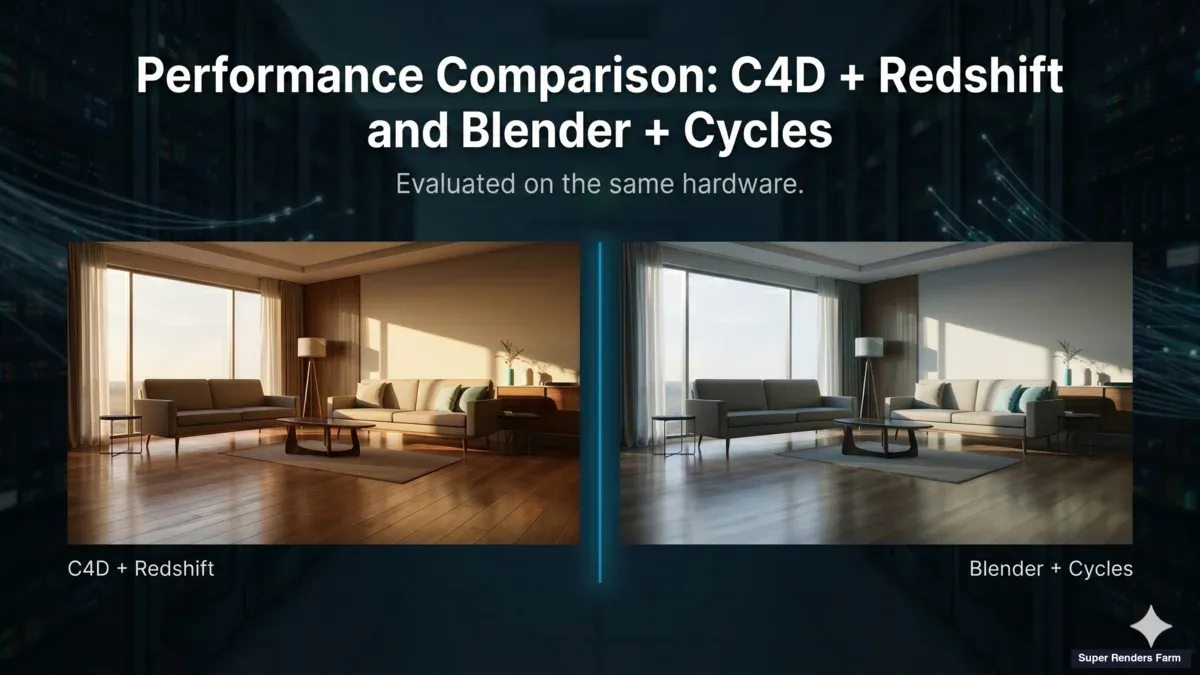
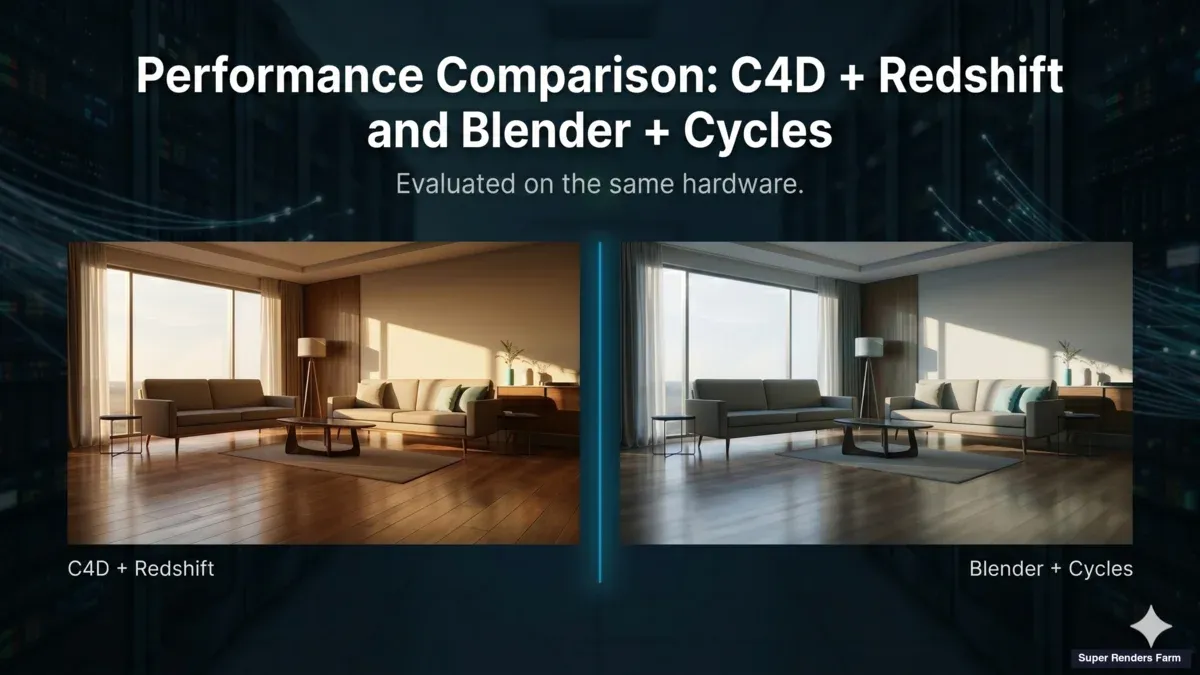
Cinema 4D and Blender side-by-side render output on identical cloud hardware
Blender vs Cinema 4D at a Glance (2026)
If you only read one section, read this one. It is the use-case-first summary; the rest of the article is the evidence behind it.
| Decision axis | Blender (free) | Cinema 4D (subscription) |
|---|---|---|
| Upfront license cost | Free, GPL, no seat cap, no license server | ~$720/year per seat (verify current rates at maxon.net) |
| Modeling & sculpting | Strong — full sculpt, retopology, Grease Pencil | Capable; designer-friendly, less sculpt-focused |
| Motion graphics / broadcast | Capable and growing (Geometry Nodes) | Category benchmark (MoGraph, Fields) |
| Character / animation | Fully capable (rigging, NLA, Grease Pencil) | Capable; not its primary focus |
| Archviz modeling | Strong with add-ons | Strong, designer-friendly |
| Learning curve | More surface area; enormous free tutorials | Faster to onboard for designers |
| Native render engines | Cycles (path-traced) + Eevee Next (raster) | Redshift (GPU) bundled with most plans |
| Plugin ecosystem | Mostly free, fast-growing | Mature commercial |
| Render-farm license handling | No license needed on the farm | License typically included in managed-farm pricing |
| Best fit | Indie, budget-conscious, character, open pipeline | Studios in motion/broadcast, designer teams |
A note on render engines, since it trips people up: Blender ships two — Cycles, a path-tracer for photoreal output, and Eevee Next, a real-time raster engine for stylized and previz work. Cinema 4D bundles Redshift, a GPU path-tracer, with most subscription tiers. When we talk about render times further down, we are comparing the path-traced engines you would actually use for final production output: Redshift in C4D versus Cycles in Blender.
Modeling, Sculpting, and Hard-Surface Work
For pure modeling, both tools are production-capable in 2026, but they lean different ways.
Blender is the stronger free sculpting and organic-modeling environment. Its sculpt mode (dynamic topology, multiresolution, a deep brush set), built-in retopology tools, and the Grease Pencil 2D/3D hybrid make it a natural fit for character artists, creature work, and anyone who models by pushing geometry rather than driving parameters. The modifier stack and Geometry Nodes also give it a procedural side that has matured considerably.
Cinema 4D is the more designer-friendly modeler. Its interface is approachable for people coming from After Effects or Photoshop, and its parametric and MoGraph-driven workflows make it fast for the kind of clean, motion-ready geometry that broadcast and commercial work needs. It is less focused on heavy sculpting — most C4D artists who need serious sculpt detail still round-trip through ZBrush.
Neither is "better" here in the abstract. If your work is character, creature, or budget-constrained organic modeling, Blender's free sculpt toolset is hard to argue with. If your work is design-led, motion-ready, parametric modeling, C4D's UI and toolset get you there with less friction.
Animation and Motion Design
This is where the two diverge most clearly, and where a lot of buying decisions actually get made.
Cinema 4D owns motion design. MoGraph (cloners, effectors) and the Fields system remain the category benchmark for broadcast graphics, commercial work, and procedural motion. If motion design is your primary service, C4D is the tool the rest of that industry is built around, and the time-to-result advantage is real.
Blender's animation toolset is fully capable — rigging, the non-linear animation editor, drivers, and Grease Pencil for 2D-in-3D — and Geometry Nodes have closed much of the procedural-motion gap that MoGraph used to monopolize. For character animation and general 3D animation, Blender holds its own at zero license cost. Where it is still catching up is the specific broadcast-motion-design workflow that C4D refined over two decades, and the depth of the commercial plugin ecosystem (Greyscalegorilla and similar) that motion designers lean on.
The honest split we see in production: studios whose main service is motion design tend to stay on C4D; studios that do motion design as one of several specialties increasingly run both, using Blender for character and general 3D and C4D for the broadcast-motion pieces.
Learning Curve, UI, and Team Onboarding
Software cost is only part of the total cost — onboarding time is the other part, and it is easy to underestimate.
Cinema 4D is faster to onboard, especially for designers. The interface is more guided, the defaults are sensible, and someone coming from the Adobe world is productive quickly. For a studio hiring designers rather than 3D specialists, that shorter ramp is a genuine operational saving.
Blender has a larger surface area. It does more out of the box — modeling, sculpting, animation, simulation, compositing, video editing — and that breadth comes with more to learn. The counterweight is the largest free tutorial ecosystem of any 3D tool, which lowers the cost of climbing the curve even if the curve itself is longer. The interface matured significantly after the 2.8 redesign, and most people who push through the first few weeks stop noticing the friction.
For team planning, a useful rule of thumb from migrations we have watched: a senior C4D motion designer takes roughly 6–9 months to reach comparable speed in Blender; a senior Blender generalist takes roughly 3–4 months in C4D. Factor that into any switch — the license savings can be real, but the productivity dip during transition is the number people forget to budget.
License and True Cost of Ownership (2026)
Here is the money question most comparisons answer vaguely.
Blender is free under the GNU GPL. No seat cap, no license server, no annual renewal. For a 30-person animation team, that is zero license cost — and the savings compound every year.
Cinema 4D is a subscription, approximately $720/year per seat as of 2026 (verify current tiers and pricing at maxon.net, as it changes). For a small team over a multi-year project, that line adds up, and the commercial plugin ecosystem some studios rely on adds more on top.
Then there is the question almost nobody addresses directly: does a render farm charge a hidden license fee? The honest answer differs by tool:
- Blender needs no license on a farm, ever. There is no license to charge for. You pay for compute time only.
- Cinema 4D and Redshift licensing on a fully managed farm is typically folded into the per-frame rendering price, so you do not carry your own Maxon seat to the cloud. That matters most for occasional C4D users — you can render a quarterly project on a farm without paying for a year-round subscription you barely use. (Always confirm license inclusion with any provider before you upload, since this varies.)
A useful breakeven heuristic from our own client data: if a project will use C4D + Redshift for fewer than roughly 600 hours of render time per year, a managed farm with bundled licenses tends to be cheaper than a self-hosted setup carrying annual subscriptions. Above that threshold, the math reverses. For Blender there is no breakeven — the engine is free regardless of volume, so the decision comes down purely to render speed and pipeline fit.
The Operator's Setup: How We Test Both Engines
Before any number means anything, the test bench has to be the same. When we benchmark internally, we run jobs on the same node class our customers use, not a one-off rig.
Hardware: dual Intel Xeon E5-2699 v4 (44 cores, 128 GB RAM) for CPU work, and NVIDIA RTX 5090 with 32 GB VRAM for GPU work. CPU rendering handles the majority of our render volume; the GPU queue runs on the RTX 5090 fleet.
Software versions (as of mid-2026):
- Cinema 4D 2025.2 with Redshift 2025.4 (GPU + CPU paths)
- Blender 4.3 LTS with Cycles X (GPU + CPU)
- Both engines pulled the same OpenEXR multi-layer output
Test scenes:
- Archviz interior: 6.2M polys, 28 lights, 4K textures, 1 frame at 3840×2160
- Motion design loop: 1.4M polys, MoGraph cloners (in C4D) / particle system (in Blender), 240 frames at 1920×1080
- Animation walk cycle: rigged character with hair groom, 320 frames at 1920×1080, depth-of-field on
We run each scene three times per engine, drop the slowest run, and report the average of the remaining two. Cycles GPU was set to 256 samples with the OptiX denoiser; Redshift was set to its standard "Quality" preset (3000 unified samples, brute force GI, 8 bounces). The key constraint: same scene complexity, same final output resolution, same denoising approach where applicable. Comparing a Redshift "Production" render to a quick preview pass is the kind of thing that produces fake winners. We do not do that here.
Render Time on Cloud Hardware: The Numbers
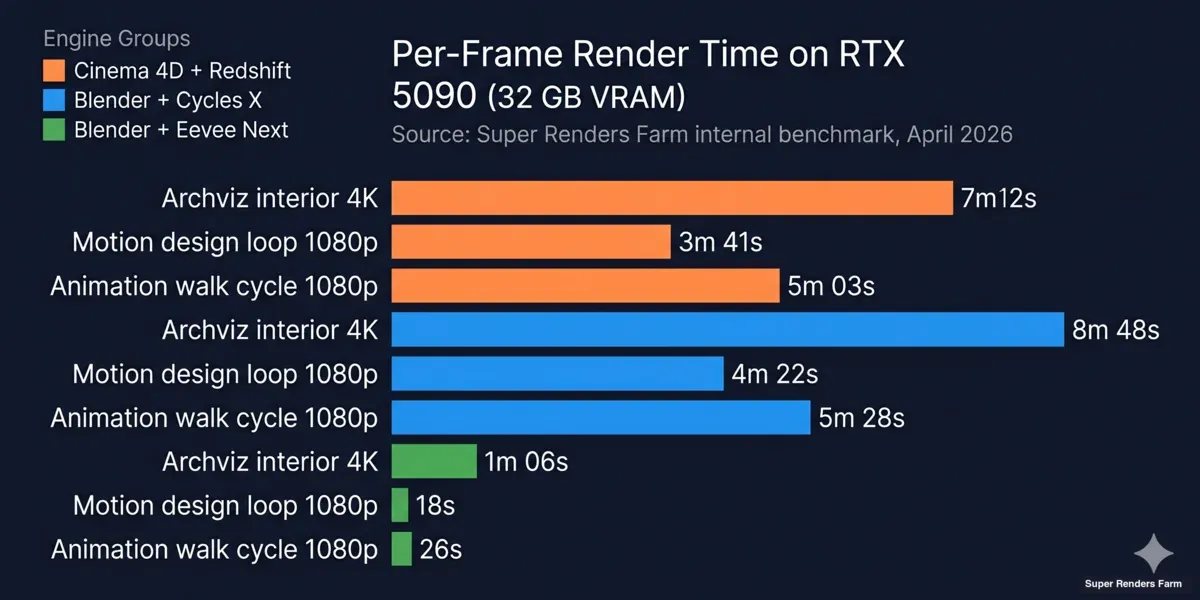
This is the section the comparison-article internet usually skips, because the data takes weeks of farm time to collect and most authors do not have a farm. We do, so here are the numbers — measured on the path-traced engines you would use for final output.
Render time benchmark Cinema 4D Redshift vs Blender Cycles on RTX 5090 cloud hardware
Per-frame averages on RTX 5090 (32 GB VRAM):
| Scene | C4D + Redshift (GPU) | Blender + Cycles X (GPU) |
|---|---|---|
| Archviz interior, 4K, 1 frame | 7m 12s | 8m 48s |
| Motion design loop, 1080p, 240f | 3m 41s/frame | 4m 22s/frame |
| Animation walk cycle, 1080p, 320f | 5m 03s/frame | 5m 28s/frame |
Per-frame averages on dual Xeon E5-2699 v4 (44 cores, CPU only):
| Scene | C4D + Redshift (CPU) | Blender + Cycles (CPU) |
|---|---|---|
| Archviz interior, 4K, 1 frame | 41m 18s | 38m 55s |
| Motion design loop, 1080p, 240f | 22m 14s/frame | 19m 07s/frame |
| Animation walk cycle, 1080p, 320f | 28m 46s/frame | 24m 12s/frame |
What stands out, honestly:
- Redshift on GPU renders most efficiently on production scenes, edging Cycles X by 15–25% on the GPU farm. The lead narrows on simple geometry and widens on complex shaders with many bounces.
- Cycles on CPU is consistently 10–18% faster than Redshift on CPU. Redshift's CPU path is a relatively recent addition and is still optimized primarily as a fallback rather than a primary target.
- The animation walk cycle gap on CPU (Cycles 24m vs Redshift 28m) reverses the GPU pattern. That is not a fluke; it is what happens when a scene has heavy hair geometry that Cycles' BVH handles efficiently in parallel.
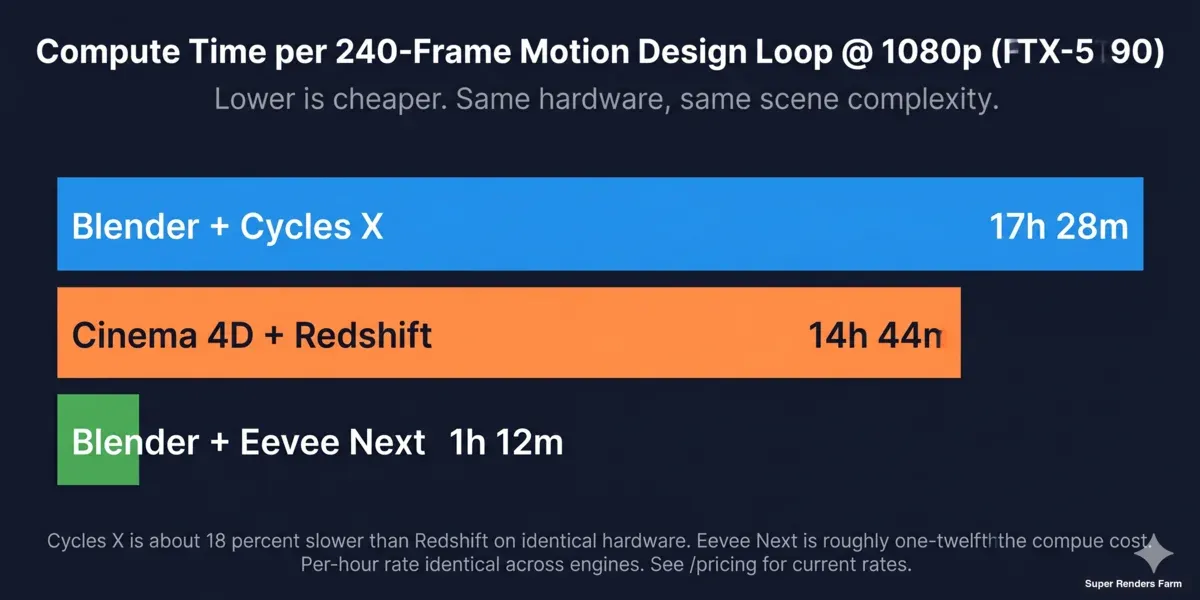
A useful way to think about these numbers: for a 240-frame motion design loop on the GPU farm, C4D + Redshift finishes in ~14h 44m of total render time and Cycles X in ~17h 28m. Same hardware, same scene, two different production realities — and which one is right for you depends as much on your toolset and budget as on the clock.
Workflow Integration on a Render Farm
Render time is a single dimension. The harder question, once you put a project on a remote farm, is how the engine behaves when it is no longer running under your direct supervision. Here the differences are larger than the benchmarks suggest.
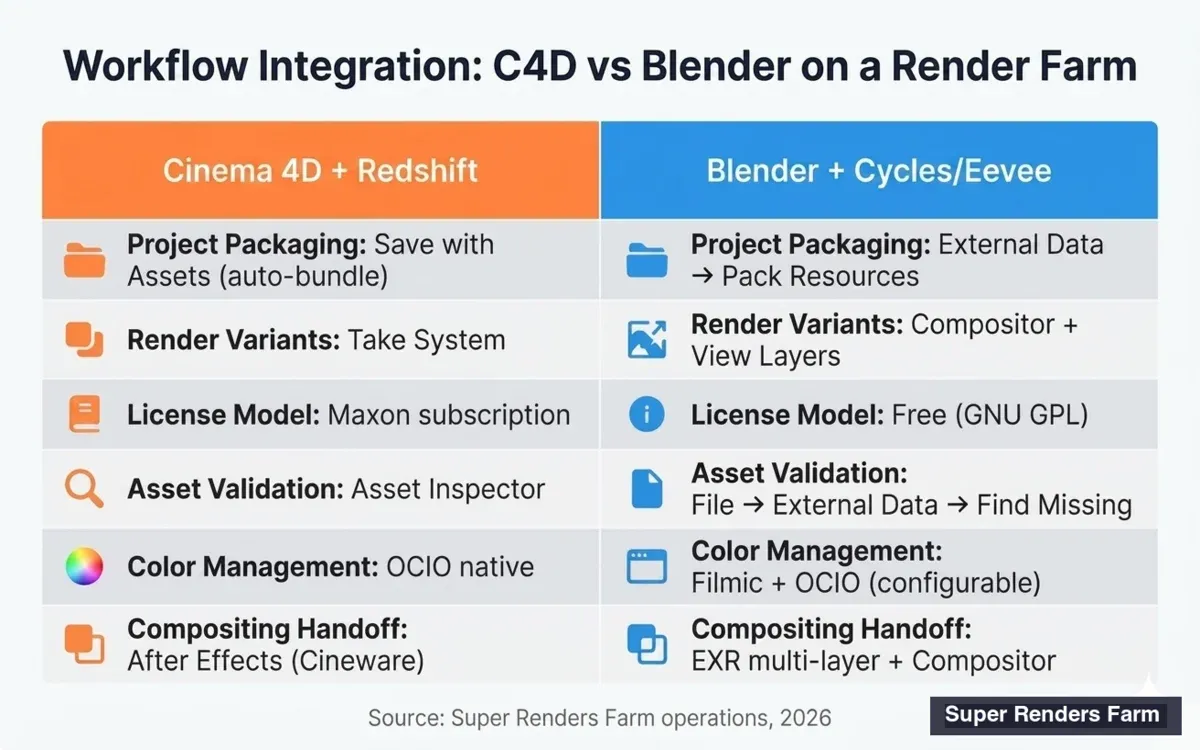
Cinema 4D vs Blender workflow integration matrix for cloud render farms
Cinema 4D pipeline strengths on a farm:
- Take System. C4D's Takes let you submit one project file with multiple render variants (camera angles, render settings, layer combinations) and pick which Takes to render at submission time. On a farm this means fewer file uploads and clean per-Take output organization.
- Asset Inspector + Save with Assets. C4D's Asset Inspector flags missing textures, IES files, and external references before submission. "Save with Assets" packages everything into a self-contained folder. We see fewer broken-path tickets on C4D submissions than on most other engines.
- Redshift integration. Because Maxon owns both, C4D + Redshift handles AOV configuration, OCIO color management, and progressive refinement consistently across versions.
Blender pipeline strengths on a farm:
- Self-contained .blend files. Blender's "Pack Resources" option embeds textures and assets into the .blend itself, which on a farm removes an entire class of broken-path problems before the upload even starts.
- Cycles persistent data. For animation, Cycles can cache scene BVH between frames, which on long sequences (>200 frames) saves 8–14% of total render time over Redshift's per-frame setup cost. We measure this on every Blender animation queue.
- EXR multi-layer native. Blender's compositor and EXR export are tightly integrated; a single .exr can carry diffuse, glossy, transmission, denoising data, cryptomatte, and arbitrary AOVs without configuration friction. This matters for any project going to a Nuke or Fusion compositing pass.
- No license server. This is not a small detail. Blender does not need a license server, a node-locked dongle, or a network reachability check. On a render farm where dozens of nodes spin up for a single job, that simplification removes an entire class of failure.
Where both engines need attention:
- Asset path resolution. Both engines store asset paths relative to the project file by default, but absolute paths sneak in (drag-and-dropped HDRIs, plugins that hardcode paths). On a farm this is the most common cause of "render started but the texture is pink" tickets — packing assets (Save with Assets / Pack Resources) before upload prevents most of them.
- Plugin parity. If your scene uses a third-party C4D plugin (X-Particles, Greyscalegorilla, etc.), the farm needs that exact plugin version installed. Blender's add-on system is similarly version-sensitive — Cycles renders that depend on a specific Geometry Nodes asset will fail silently if the add-on version drifts.
- Licensing model. Cinema 4D requires an active Maxon subscription per render node, or a render farm that includes the license. On a fully managed farm the C4D + Redshift license is typically folded into the per-frame cost. Blender is free everywhere, which removes the conversation entirely.
For studios standardizing on a single pipeline, the integration question often comes down to color management and compositing handoff. C4D + Redshift behaves predictably with OCIO and Maxon's Image Reference workflow. Blender's color management is configurable but more frequently misconfigured at submission time — we see roughly twice as many color-mismatch tickets on Blender jobs, almost always traceable to a wrong View Transform or a forgotten color-management setting.
Cost-Per-Frame Comparison
Render time is a clock. Cost-per-frame is what actually shows up in your project budget. Here is how the two engines compare on the same farm pricing model.
Cost-per-frame comparison Cinema 4D Redshift vs Blender Cycles cloud render farm
On our farm, GPU rendering is billed at $0.003 per OctaneBench-hour (OBh) and CPU rendering at $0.004 per GHz-hour (rising toward $0.016/GHz-hr at the highest priority tiers), with all render-engine licenses — Redshift included — folded into that rate. New accounts also start with $25 of free trial credit that never expires, which is enough to render a test frame both ways before you commit to a tool. Full breakdown on our pricing page.
Worked example — a 240-frame motion design loop at 1080p on the GPU farm:
- C4D + Redshift on RTX 5090: ~14h 44m total render time, billed per OBh at the standard GPU rate. License (Redshift + C4D) bundled — no separate Maxon subscription needed for the render.
- Blender + Cycles X on RTX 5090: ~17h 28m total render time → roughly 18% more compute time, so roughly 18% higher per-frame compute cost. Zero license cost, since Blender is free.
On CPU render queues the picture flips slightly. Cycles' efficient CPU implementation makes it about 10–15% cheaper per frame than Redshift CPU on the same Xeon hardware, billed per GHz-hour.
Hidden costs to factor in:
- Cinema 4D subscription. If you are buying it yourself, C4D runs approximately $720/year per seat (verify at maxon.net). Across a team of five over a 12-month project, that is several thousand dollars of license overhead before any render bill.
- Plugin ecosystem. C4D's commercial plugin ecosystem adds genuine capability but compounds the subscription cost. Blender's add-on equivalents are mostly free or one-time purchases.
- Render-farm savings. On a managed farm, included licenses (C4D + Redshift) flatten part of the subscription cost into per-frame pricing. For occasional users, this can be cheaper than maintaining a year-round subscription.
For deeper context on how cloud render bills get calculated, our render farm pricing models guide walks through the four common pricing structures. And for a C4D-internal view — comparing Redshift, Octane, Arnold, and V-Ray on the same cloud hardware once the engine choice is between C4D-native renderers — see our best Cinema 4D render farm comparison for 2026.
Workflow Notes: A Fully Managed Render Farm
A quick operator note on how the rendering actually happens, because it shapes the cost math above. On a fully managed farm you do not remote-desktop into a machine, install Blender or Cinema 4D yourself, or wrangle licenses node by node. You upload the project, the farm renders it on the right node class with the licenses already in place, and you download the frames. That managed model is the genuine edge over IaaS-style farms where you rent a bare machine and do the setup yourself — and it is true regardless of which engine you picked.
Super Renders Farm is a US-headquartered company (Super Renders Farm LLC, Santa Ana, California) with US-based billing in USD, a US support phone line, and 24/7 live chat — so there is real accountability and recourse behind the service, not just a checkout page. That is the practical part of "who are you actually handing your project to" that most tool comparisons never get to.
Where Each Engine Wins on a Cloud Farm
After running both engines daily, the patterns are stable enough to summarize honestly.
Cinema 4D + Redshift wins clearly when:
- Motion design is the primary use case. MoGraph, Fields, and the procedural toolset have no full equivalent in Blender. Studios doing broadcast or commercial motion design get more done per day in C4D.
- The team already lives in the Adobe ecosystem. C4D's bidirectional link with After Effects (via Cineware) and the Maxon ecosystem matter for studios with existing pipelines. For a team doing a lot of Cinema 4D rendering, the integration debt of switching to Blender is a real cost.
- Time-to-first-render matters more than license cost. C4D's UI is faster to onboard for designers coming from After Effects or Photoshop than Blender's UI is for the same audience.
Blender + Cycles wins clearly when:
- Open-source pipeline is non-negotiable. For studios with security, sovereignty, or licensing-policy constraints (some government and education clients), Blender is the only realistic choice.
- Animation projects span many seats. Blender scales to a 30-person animation team without per-seat license cost — the savings compound fast. Several short-film studios we work with run pure Blender for exactly this reason.
- Cycles' broad GPU compatibility matters. Cycles supports CUDA, OptiX, HIP (AMD), and Metal (Apple Silicon). Redshift focuses on NVIDIA. If your local GPU plan ever needs to span vendors, Blender's flexibility is real. We cover the broader landscape in our Blender cloud render farm guide.
Where the two engines are genuinely interchangeable:
- Single still archviz renders at 4K with comparable hardware budgets — render time is within ±20%, and output quality is comparable to clients who do not know the difference.
- Product visualization with simple turntable animation — both handle it cleanly; pick the engine your team knows better.
- Look development for VFX shots that will ultimately render in another engine (Arnold, V-Ray) — both work fine for blocking and approvals.
For C4D users whose engine choice is Redshift specifically — common for motion design and broadcast work — the farm-side setup has its own GPU-allocation and licensing considerations beyond the engine-vs-engine framing above. Our Cinema 4D Redshift render farm guide covers the C4D + Redshift submission workflow on cloud GPU nodes specifically.
Decision Framework
Most studios pick the wrong tool for the wrong reason — usually because a senior designer prefers one UI, or because the team got a discount on a plugin bundle. Here is a more useful framework based on what we see in production.
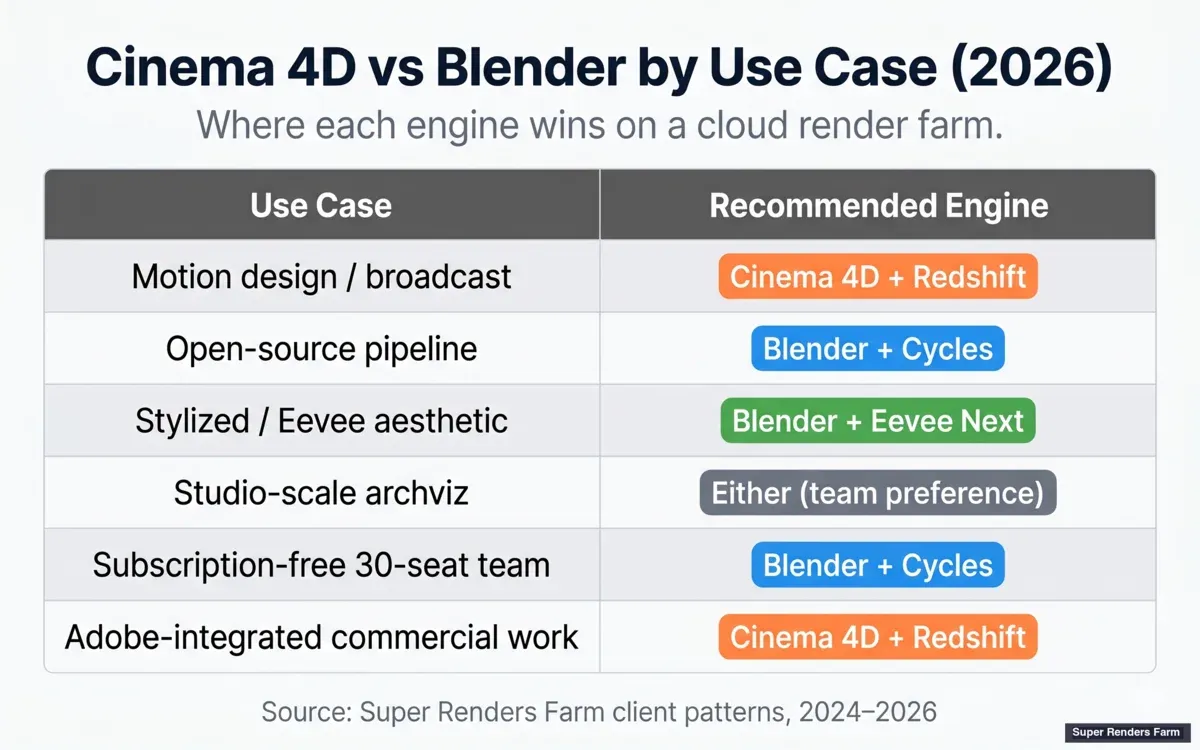
Cinema 4D vs Blender decision matrix by use case for cloud rendering
Five questions to ask before committing:
- What does your output ratio look like by year-end? If 60%+ is motion design or commercial broadcast: lean C4D + Redshift. If 60%+ is animation, archviz, character, or open-pipeline VFX: lean Blender + Cycles. If split: maintain both.
- What is your team's switching cost? A senior C4D motion designer takes 6–9 months to reach the same speed in Blender. A senior Blender generalist takes 3–4 months in C4D. Factor this into any migration plan.
- How important is plugin parity to your existing scenes? If your archive of past projects depends on specific C4D plugins or Greyscalegorilla scenes, migration to Blender means rebuilding effects, not just retraining.
- What is your render-farm strategy? If you plan to use a managed farm with included licenses, the C4D subscription cost evaporates into per-frame pricing. If you plan to self-host, Blender's zero-license model compounds savings every quarter.
- Who are you hiring? If you hire designers, C4D's shorter ramp is a real saving. If you hire 3D generalists or character artists, Blender's breadth and zero cost are hard to beat.
Migration paths between the two:
- C4D → Blender: USD and FBX interchange handle static geometry reasonably; animated rigs need rebuilding. Plan 3–6 months for a senior team to reach 80% of prior speed. Material conversion (Redshift → Cycles Principled BSDF) is the most straightforward part; rigs and effects take the longest.
- Blender → C4D: USD interchange is the cleanest path in 2026. C4D's Asset Browser handles imported USD reliably, and Redshift can convert most Cycles material graphs via Principled BSDF mapping. Rigs need rebuilding using C4D's Character Object or third-party rigging tools.
Honest pros/cons summary:
| Dimension | Cinema 4D + Redshift | Blender + Cycles |
|---|---|---|
| Render speed (GPU, path-traced) | Renders most efficiently (~15–25% lead) | Competitive |
| Render speed (CPU) | Slower (~10–18%) | Slightly faster |
| Upfront license cost | ~$720/yr per seat (or bundled in farm pricing) | Free, always |
| Modeling & sculpting | Designer-friendly; less sculpt-focused | Strong sculpt + retopology |
| Motion design tooling | Strongest in the category (MoGraph, Fields) | Capable but not equivalent |
| Open-source pipeline | No | Yes |
| Plugin ecosystem | Mature commercial | Mostly free, growing |
| Team training time | Faster onboarding for designers | Steeper for non-3D natives |
| Best-fit studio profile | Motion / broadcast / designer teams | Indie / budget / character / open pipeline |
| Render-farm license | Usually included in managed-farm pricing | None needed |
For studios standardizing in 2026, our most common recommendation is: pick the tool your highest-paid artists already ship work in, then revisit in 18 months when the project mix has shifted.
If your evaluation spans more than these two, our four-way 3D modeling software comparison puts Blender, Cinema 4D, Maya, and 3ds Max side by side on cost and pipeline fit. The "better" tool on a feature-by-feature basis is whichever one your team works most efficiently in. For a deeper view of how our hardware handles each engine, see the underlying render farm hardware benchmarks. And if your decision is part of a wider tool evaluation, our sibling comparisons — Blender vs Maya and Cinema 4D vs Maya — cover the other pairings in the same honest, operator-first way.
FAQ
Q: Is Blender or Cinema 4D better for beginners in 2026? A: Cinema 4D is usually faster to learn for designers because of its more guided interface and MoGraph workflow, while Blender has a larger feature surface but an enormous free tutorial ecosystem and zero license cost, so the better choice depends on whether you optimize for onboarding speed or for budget and breadth.
Q: Is Blender really free for cloud rendering, or do render farms charge a hidden license fee? A: Blender is genuinely free under the GNU GPL, and that extends to cloud rendering — no render farm charges a Blender license fee because there is no license to charge for. What you pay for on a Blender render farm is compute time only.
Q: Do I need a Cinema 4D license to render C4D files on a cloud render farm? A: On a fully managed farm the Cinema 4D and Redshift licensing is typically included in the rendering price, so you do not carry your own seat to the cloud; Blender needs no license at all on the farm because it is free and open-source. Confirm license inclusion with any farm before you upload, since this varies by provider.
Q: Which engine renders most efficiently for animation on the same hardware? A: It depends on the renderer and hardware path. On NVIDIA GPUs with path-traced output, Cinema 4D + Redshift is consistently 15–25% faster than Blender + Cycles X in our benchmarks, while on CPU-only rendering Cycles is 10–18% faster than Redshift's CPU path, so the most efficient choice flips depending on whether you render on GPU or CPU.
Q: Does Redshift run faster inside Cinema 4D than inside Blender? A: Redshift is not officially available inside Blender — it ships as a plugin for Cinema 4D, Maya, Houdini, and 3ds Max only. The closest comparison is Redshift in C4D versus Cycles in Blender, which is what we benchmark in the section above.
Q: How does motion design in Blender compare to Cinema 4D in 2026? A: Blender's Geometry Nodes have closed much of the gap on procedural motion design that MoGraph used to monopolize, but Cinema 4D's MoGraph and Fields combination is still faster for the broadcast and commercial work it was designed for, so studios doing pure motion design tend to stay on C4D while studios that do it as one of several specialties increasingly run both.
Q: Does cloud rendering cost the same for Cinema 4D and Blender on the same hardware? A: Per-hour compute cost is the same — the same GPU node renders both engines at the same hourly rate — but per-frame cost differs because Redshift typically renders 15–25% faster than Cycles X on identical hardware, so a Redshift frame uses less compute time, while Cinema 4D's license is folded into managed-farm per-frame pricing and Blender carries none.
Q: Should studios switch from Cinema 4D to Blender to save money? A: Not as a primary motivation, because most studios underestimate the productivity loss during the 6–9 month transition; if the team's existing speed in C4D translates to revenue, the math rarely justifies the disruption, and the switch tends to pay off only for studios growing past 10+ seats or new studios building a pipeline from scratch.
Q: Which 3D software should I learn first if I want the most career options? A: Both are worth knowing, but Blender is the lowest-risk starting point because it is free and has the largest learning ecosystem, while Cinema 4D is the stronger specialization if you are targeting motion design and broadcast studios specifically — many working artists end up comfortable in both, since studios pick their tool by department rather than by individual preference.
About Thierry Marc
3D Rendering Expert with over 10 years of experience in the industry. Specialized in Maya, Arnold, and high-end technical workflows for film and advertising.