
Construire ou louer une render farm : le vrai coût comparé
Aperçu
Introduction
Chaque année, les studios font face à la même décision : construire une render farm locale ou payer pour du rendu cloud ? La réponse semble simple — calculer les chiffres, choisir l'option la moins chère. Mais la plupart des comparaisons de coûts ne prennent en compte que la moitié du tableau.
Nous exploitons une render farm en production depuis plus de 15 ans, prenant en charge V-Ray, Corona, Redshift, Arnold et toutes les applications DCC majeures. Durant cette période, nous avons vu des studios construire des fermes, en dépasser la capacité, les remplacer, et parfois les abandonner entièrement. Le schéma est constant : l'achat matériel initial semble être la grande décision, mais ce sont les coûts récurrents — licences de moteur de rendu, maintenance logicielle, énergie, climatisation, temps IT — qui déterminent si la construction en valait vraiment la peine.
Ce guide détaille chaque catégorie de coûts liée à la construction d'une render farm locale en 2026 et la compare au rendu cloud. Nous utilisons des chiffres réels : prix GPU actuels en magasin (non MSRP), tarifs d'électricité réels, frais de licence tirés directement des pages de tarification des éditeurs, et charges opérationnelles basées sur ce que nous observons réellement dans les studios. Aucune hypothèse, aucun scénario tricoté sur mesure.
Que vous soyez un studio d'archviz de 5 personnes rendant 50 heures par mois ou une maison VFX de 30 personnes qui dépasse 500 h, le calcul est différent. L'objectif ici est de vous donner le cadre pour effectuer vos propres calculs avec précision — non pas de vous dire quoi faire.
Le vrai coût de la construction d'une render farm en 2026
Les coûts matériels dépendent entièrement de si vous construisez une ferme à base de CPU (pour les workflows V-Ray, Corona, Arnold CPU) ou une ferme GPU (pour Redshift, Octane, V-Ray GPU). Les deux sont devenus plus chers en 2026.
Render farm CPU (10 nœuds)
Un nœud de rendu CPU de qualité production en 2026 tourne généralement avec des processeurs Intel Xeon double et 96 à 256 Go de RAM. Le coût par nœud varie de 5 000 $ à 7 300 $ selon la configuration.
| Composant | Par nœud | 10 nœuds |
|---|---|---|
| Double Xeon E5-2699 V4 (44 cœurs) | 3 000 $–4 500 $ | 30 000 $–45 000 $ |
| 128 Go de RAM ECC | 800 $–1 200 $ | 8 000 $–12 000 $ |
| 1 To NVMe + boîtier + alimentation | 700 $–1 000 $ | 7 000 $–10 000 $ |
| Switch réseau + câblage | — | 500 $–1 000 $ |
| Total | 4 500 $–6 700 $ | 45 500 $–68 000 $ |
Render farm GPU (5 nœuds)
Les fermes GPU sont là où les prix 2026 ont évolué de manière significative. La NVIDIA RTX 5090 a été lancée à un prix public de 1 999 $, mais les prix réels en magasin en avril 2026 varient de 2 500 $ à 3 800 $ en raison des pénuries de mémoire GDDR7 et de la demande en calcul IA. Les variantes personnalisées et à refroidissement liquide dépassent 5 000 $.
| Composant | Par nœud (1 GPU) | 5 nœuds |
|---|---|---|
| RTX 5090 (32 Go VRAM) | 2 500 $–3 800 $ | 12 500 $–19 000 $ |
| CPU + carte mère + 64 Go RAM | 2 000 $–2 800 $ | 10 000 $–14 000 $ |
| Alimentation 1 200 W + boîtier + refroidissement | 500 $–800 $ | 2 500 $–4 000 $ |
| Réseau + stockage partagé | — | 3 000 $–5 000 $ |
| Total | 5 000 $–7 400 $ | 28 000 $–42 000 $ |
Pour une configuration à deux GPU par nœud — courante pour les productions Redshift et Octane — multipliez les coûts GPU en conséquence. Une ferme de 5 nœuds et 10 GPU peut dépasser 60 000 $ en matériel seul.
Ce sont les coûts du premier jour. Le matériel commence à se déprécier immédiatement, les fermes GPU perdant environ 25 % de leur valeur chaque année. Une ferme RTX 5090 construite aujourd'hui offrira approximativement un tiers du débit de ce qui sortira en 2029, tout comme les fermes RTX 3090 de 2022 livrent aujourd'hui environ un tiers des performances actuelles des RTX 5090 dans les workloads V-Ray GPU.
Le piège des licences
Le matériel attire toute l'attention, mais les licences sont le coût qui surprend le plus les studios. Chaque moteur de rendu facture une licence par nœud pour l'utilisation en ferme, et ces frais sont annuels.
Sur la base des tarifications des éditeurs au T1 2026 :
| Moteur | Licence annuelle | Coût ferme 10 nœuds |
|---|---|---|
| V-Ray | 208 $/an (unitaire) ; 167 $–188 $/an (volume) | 1 670 $–2 080 $ |
| Corona | 172 $/an (unitaire) ; 140 $–154 $/an (volume) | 1 400 $–1 720 $ |
| Redshift | 264 $/an (individuel) ; 299 $/an Teams (min 3 postes) | 2 640 $–2 990 $ |
| Arnold | 415 $/an (inclut 5 nœuds de rendu) | 830 $+ (2 packs) |
| Octane | Tarification entreprise requise pour ferme | Variable |
Une ferme GPU de 10 nœuds sous Redshift Teams coûte 2 990 $ par an en licences de moteur de rendu seules — avant d'avoir rendu une seule image.
Les licences d'applications DCC ajoutent une autre couche. 3ds Max et Maya autorisent le rendu en ligne de commande gratuit sur les nœuds de ferme. Cinema 4D exige des licences Team Render par nœud. After Effects nécessite un abonnement complet par nœud de rendu sauf si vous utilisez un moteur de rendu dédié.
Pour une ferme mixte de 10 nœuds, les licences logicielles totales s'élèvent généralement à 2 000 $ à 5 500 $ par an — une dépense récurrente qui ne s'arrête jamais, que la ferme soit en train de rendre ou en veille.
Coûts opérationnels cachés
Les coûts présentés ci-dessous sont réels, documentés, et systématiquement sous-estimés par les studios qui construisent leur première ferme.
Électricité et climatisation
Une ferme de 10 nœuds CPU consommant 500 W par nœud à 50 % d'utilisation moyenne, avec le tarif électricité commercial américain moyen de 0,17 $/kWh :
- Électricité annuelle : 10 nœuds x 500 W x 0,5 utilisation x 8 760 heures x 0,17 $/kWh = 3 723 $
- Charge de climatisation (généralement 30 à 40 % du coût d'énergie de calcul) : 1 100 $–1 500 $
- Total : 4 800 $–5 200 $/an
Les nœuds GPU consomment davantage d'énergie. Une RTX 5090 à pleine charge tire 575 W pour le GPU seul, plus le CPU et l'alimentation système. Une ferme de 5 nœuds GPU à 50 % d'utilisation engendre environ 3 500 $–4 800 $/an en électricité et climatisation.
Ces coûts évoluent linéairement avec l'utilisation — et s'appliquent même pendant les charges non productives comme les rendus échoués, les images de test, et les mises à jour logicielles.
Administration IT
Quelqu'un doit maintenir la ferme. Mises à jour logicielles, correctifs de pilotes, résolution des jobs échoués, gestion du stockage, maintenance des serveurs de licences — ce n'est pas un travail optionnel.
Les studios rapportent généralement 5 à 10 heures par semaine de maintenance de ferme. À un tarif IT conservateur de 50 $/heure, cela représente 13 000 $–26 000 $ par an en main-d'œuvre. Pour les studios sans personnel IT dédié, ce travail incombe aux artistes, ce qui représente un coût d'opportunité encore plus élevé — un artiste 3D senior qui passe du temps à dépanner des nœuds de rendu au lieu de travailler sur des projets facturables.
Gestion des versions et stockage
Maintenir des versions identiques de logiciels, plugins et assets synchronisées sur 10 nœuds exige une coordination. Une mise à jour mineure de V-Ray ou une mise à jour de Forest Pack nécessite des tests sur un nœud avant d'être déployée sur tous — et des versions incompatibles entre nœuds produisent des rendus incohérents.
Un stockage partagé rapide (NAS 10 GbE ou mieux) coûte 3 000 $–8 000 $ initialement, plus la maintenance continue. Sans cela, les artistes copient manuellement les fichiers de projet sur chaque nœud, ce qui est lent et source d'erreurs.
Coût total de possession : un exemple réel
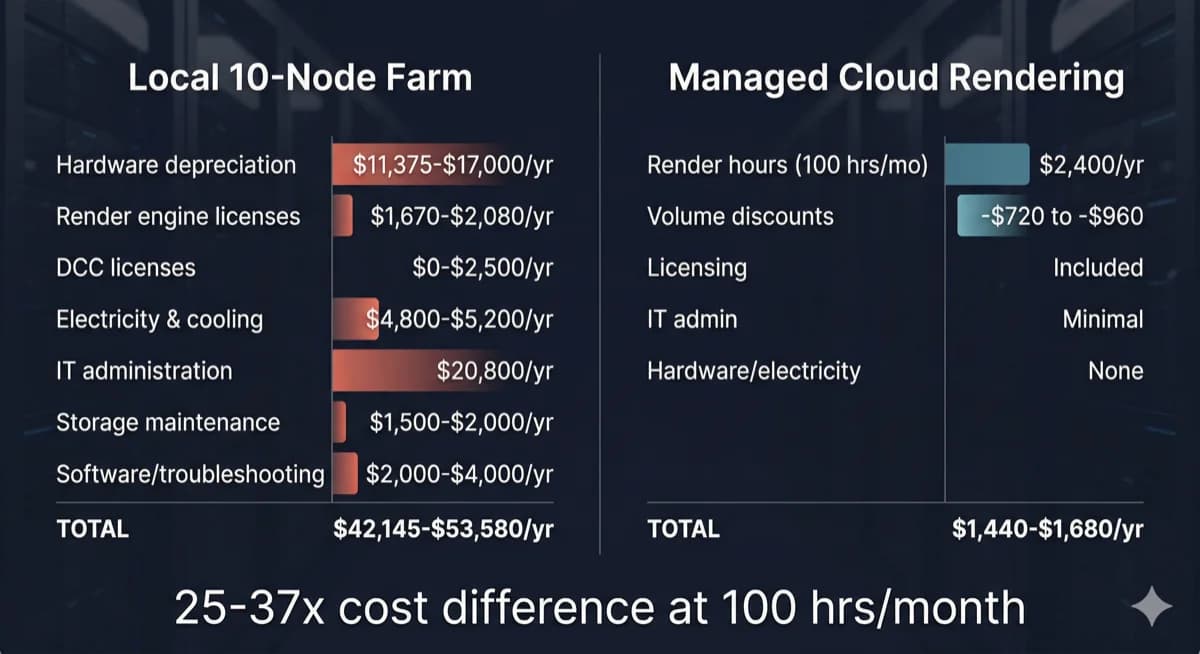 Comparaison du coût total de possession entre une render farm locale de 10 nœuds et le rendu cloud géré
Prenons l'exemple d'un studio d'archviz de 12 personnes rendant 80 à 120 heures V-Ray CPU par mois — un profil courant parmi nos clients.
Option A : Construire une ferme CPU de 10 nœuds
| Catégorie de coût | Coût annuel |
|---|---|
| Matériel (amorti sur 4 ans) | 11 375 $–17 000 $ |
| Licences V-Ray (10 nœuds) | 1 670 $–2 080 $ |
| Licences DCC (si applicable) | 0 $–2 500 $ |
| Électricité et climatisation | 4 800 $–5 200 $ |
| Administration IT (8 h/semaine) | 20 800 $ |
| Maintenance stockage partagé | 1 500 $–2 000 $ |
| Dépannage logiciel, mises à jour | 2 000 $–4 000 $ |
| Total annuel | 42 145 $–53 580 $ |
Option B : Rendu cloud géré
| Catégorie de coût | Coût annuel |
|---|---|
| Heures de rendu (100 h/mois x 2 $/h en moyenne) | 2 400 $/an |
| Remises sur volume (30 à 40 % typiquement sur le marché ; les nôtres vont jusqu'à 30 %) | -720 $ à -960 $ |
| Licences de moteur de rendu | Incluses |
| Administration IT | Minimale |
| Matériel, électricité, climatisation | Aucun |
| Total annuel | 1 440 $–1 680 $ |
La différence n'est pas marginale. À 100 heures CPU par mois, le rendu cloud coûte environ 3 à 4 % du coût d'une ferme locale quand vous incluez le TCO complet. Même si vous triplez l'utilisation cloud à 300 heures par mois, le coût annuel cloud (4 320 $–5 040 $) reste une fraction des 42 000 $–54 000 $ de la ferme locale.
Pour une ventilation détaillée du coût par image selon les différents moteurs de rendu et complexités de scène, consultez notre guide du coût par image en render farm.
Mais j'ai déjà ma station de travail
C'est l'objection la plus fréquente que nous entendons, et elle mérite une réponse directe.
Si vous possédez déjà du matériel de rendu, le coût d'achat est un coût irrécupérable — il est dépensé quoi que vous fassiez ensuite. La question n'est pas « ai-je gaspillé de l'argent ? » mais « quel est l'usage le plus productif de ce matériel à l'avenir ? »
Trois facteurs importent :
La dépréciation est continue. Votre matériel perd de la valeur chaque mois. Une RTX 3090 achetée en 2022 pour 1 500 $ vaut aujourd'hui environ 400 $ et offre une fraction des performances de la génération actuelle. Conserver du matériel vieillissant ne préserve pas votre investissement — cela le prolonge au-delà du point de rendement compétitif.
Le coût d'opportunité est réel. Chaque heure que votre station de travail passe à rendre est une heure qu'elle ne peut pas consacrer à la modélisation, la texture, ou la préparation de scène. Pour un artiste solo, cela signifie choisir entre productivité et rendu. Le rendu cloud élimine entièrement ce compromis — votre station de travail reste disponible pour le travail interactif pendant que les rendus s'exécutent sur une infrastructure dédiée.
Les coûts de maintenance continuent. L'électricité, la climatisation, les mises à jour logicielles et le dépannage ne s'arrêtent pas parce que le matériel est amorti. Un nœud de rendu « gratuit » coûte encore 1 500 $–3 000 $ par an en dépenses opérationnelles quand vous comptez l'énergie, les licences et le temps consacré à sa gestion.
L'approche la plus pratique pour les studios disposant de matériel existant : utilisez vos machines locales pour les rendus de test rapides et les aperçus de viewport, puis envoyez les rendus finaux de production vers l'infrastructure cloud. Ce modèle hybride maximise la valeur du matériel que vous possédez déjà tout en évitant les limitations de montée en charge et la charge de maintenance d'une ferme locale complète.
Quand construire sa propre ferme est vraiment judicieux
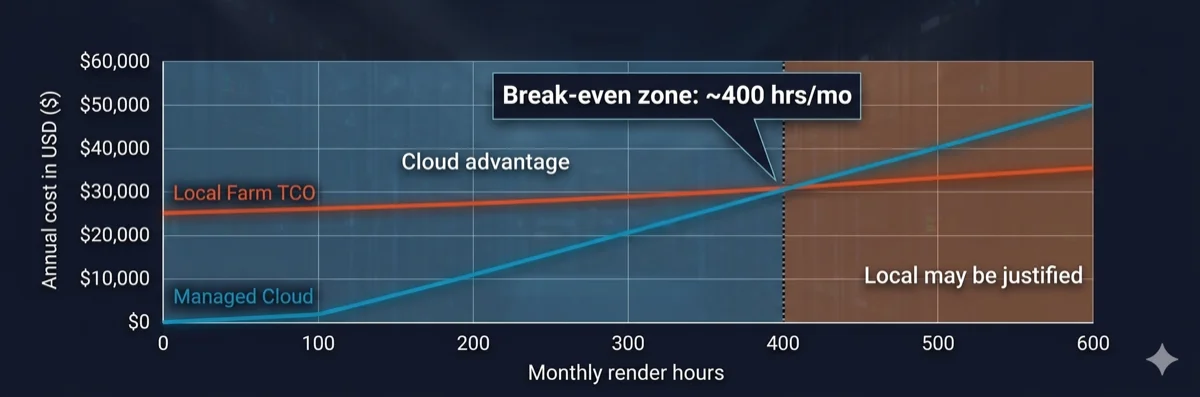 Graphique d'analyse du seuil de rentabilité montrant que le rendu cloud est moins cher en dessous de 400 heures de rendu mensuelles
Les render farms locales ne sont pas toujours le mauvais choix. Elles ont du sens économiquement dans des conditions spécifiques :
- Volume élevé et constant : votre studio rend 400+ heures par mois, chaque mois, avec une variation saisonnière minimale. À ce volume, le coût horaire du matériel possédé passe en dessous des tarifs cloud.
- Exigences de sécurité des données : des obligations de conformité (contrats gouvernementaux, projets de divertissement sous NDA strict) exigent que toutes les données restent sur site sans transfert externe.
- Workflows itératifs en temps réel : rendus de test rapides où la latence réseau vers une ferme cloud ralentirait les cycles d'itération — bien que cela s'applique généralement aux stations de travail individuelles, pas au rendu à l'échelle d'une ferme.
- Infrastructure IT existante : vous disposez déjà de personnel IT dédié, d'espace en rack, de capacité électrique et de climatisation — ce qui réduit le coût marginal d'ajout de nœuds de rendu.
Si moins de trois de ces conditions s'appliquent à votre studio, les chiffres favorisent presque toujours le rendu cloud. Pour une analyse approfondie de la façon dont les render farms traitent les jobs et de la place du cloud dans les pipelines de production, consultez notre guide technique sur le fonctionnement des render farms.
Rendu cloud : ce que vous payez vraiment
Tous les services de rendu cloud ne fonctionnent pas de la même manière. La distinction qui compte le plus est entre les plateformes IaaS (Infrastructure as a Service) et les fermes entièrement gérées.
Le rendu cloud IaaS vous donne un accès à distance au matériel — en substance, vous louez une machine. Vous installez vos propres logiciels, gérez vos propres licences, résolvez vos propres problèmes. Le tarif horaire semble plus bas, mais vous absorbez la charge opérationnelle : coûts de licences, configuration logicielle, gestion des jobs, et débogage. Les studios utilisant des plateformes IaaS rapportent généralement 5 à 15 heures par mois de configuration et de dépannage — la même charge IT qu'une ferme locale, mais sur le matériel de quelqu'un d'autre.
Le rendu cloud entièrement géré inclut tout : logiciels pré-installés, licences de moteur de rendu intégrées dans le tarif horaire, gestion des jobs prise en charge par l'équipe de la ferme, et support technique lorsque les scènes échouent. La charge opérationnelle qui coûte aux opérateurs de fermes locales 13 000 $–26 000 $ par an en main-d'œuvre IT est absorbée par le service.
Sur notre ferme, nous incluons V-Ray, Corona, Redshift, Arnold et toutes les applications DCC majeures dans le coût de rendu. Il n'y a pas de frais de licence séparés, pas d'étapes d'installation logicielle, et pas de frais de licence par nœud. Vous téléversez votre scène, nous la rendons, vous téléchargez le résultat. Pour les studios qui comparent leurs options, comprendre cette distinction est essentiel — un tarif IaaS à « 1,50 $/heure » avec 3 000 $/an en licences et 10 heures/mois d'administration n'est pas moins cher qu'un tarif entièrement géré à « 2,00 $/heure » avec tout inclus.
Pour comprendre en détail les différences entre les modèles gérés et en libre-service, lisez notre comparaison rendu cloud géré vs DIY. Pour un aperçu plus détaillé de la façon dont les workloads GPU influencent les coûts de rendu, consultez notre vue d'ensemble du rendu cloud.
Ferme cloud gérée vs bureau à distance en location : les maths cachées
La section précédente a introduit la distinction IaaS vs géré. Mais l'écart de coût entre ces deux modèles est plus large que la plupart des comparaisons ne le suggèrent — parce que les pages de tarification standards affichent le tarif horaire annoncé, pas le tarif horaire effectif. Comprendre la différence exige d'examiner ce qui se passe lors d'une session typique de rendu sur bureau à distance.
Consommation de sièges de licence
Lorsque vous rendez sur un bureau à distance, votre propre licence DCC occupe cette machine. Un siège d'abonnement Autodesk tournant sur une VM cloud signifie un artiste de moins pouvant travailler localement. Pour un studio avec cinq sièges Maya, en envoyer deux sur des machines de rendu à distance laisse trois disponibles pour le travail interactif — une réduction de capacité de 40 % pendant les sessions de rendu.
Les fermes cloud gérées traitent les licences différemment. Les licences de moteur de rendu (V-Ray, Corona, Redshift, Arnold) sont intégrées dans le service — la ferme opère son propre pool de licences. Vos sièges locaux restent disponibles pour que les artistes continuent à modéliser, texturer et préparer des scènes pendant que les rendus s'exécutent sur l'infrastructure de la ferme.
Temps d'inactivité facturé
La facturation sur bureau à distance démarre quand la machine démarre, pas quand le rendu commence. Une session typique inclut du temps non-rendu qui vous est quand même facturé :
- Téléversement de scène : transfert des fichiers de projet, textures et assets vers la machine distante (5 à 20 minutes selon la taille du projet et la vitesse de connexion)
- Configuration logicielle : vérification de la version du moteur de rendu, chargement des plugins, vérification de la compatibilité de la scène (5 à 15 minutes)
- Téléchargement post-rendu : récupération des images finies vers votre stockage local (5 à 15 minutes)
Sur une ferme gérée, vous soumettez un fichier de scène via le système d'upload de la ferme. La ferme gère en interne la distribution des fichiers, la configuration logicielle et la mise en file d'attente des jobs. Vous êtes facturé pour le temps de rendu réel — le compteur démarre quand les images commencent à être traitées, pas quand votre upload commence.
Charge de configuration par session
La plupart des plateformes de bureau à distance exigent de vérifier les versions logicielles, de réinstaller les plugins s'ils ont été mis à jour, et de configurer les paramètres de rendu à chaque session. Les studios rapportent 30 à 60 minutes de configuration non-rendu par session — du temps entièrement facturé au tarif horaire annoncé.
Cette charge s'accumule avec la fréquence. Un studio effectuant 20 sessions de rendu par mois avec 30 minutes de configuration chacune passe 10 heures mensuelles sur la configuration seule — avant qu'une seule image ne soit rendue.
Tarif horaire effectif : les vrais calculs
Voici comment le tarif annoncé se traduit en tarif effectif pour une session typique de rendu GPU sur une plateforme de bureau à distance :
| Composant | Durée | Coût à 9 $/h |
|---|---|---|
| Démarrage machine + vérification logicielle | 10 min | 1,50 $ |
| Téléversement de scène et configuration | 15 min | 2,25 $ |
| Rendu réel | 60 min | 9,00 $ |
| Téléchargement post-rendu | 5 min | 0,75 $ |
| Total session | 90 min | 13,50 $ |
Tarif horaire effectif pour le rendu réel : 13,50 $ — 50 % de plus que le tarif annoncé de 9 $/heure. Et ce calcul suppose que tout fonctionne du premier coup. Des rendus échoués, des conflits de plugins ou des incompatibilités de version ajoutent encore plus de temps non productif facturé.
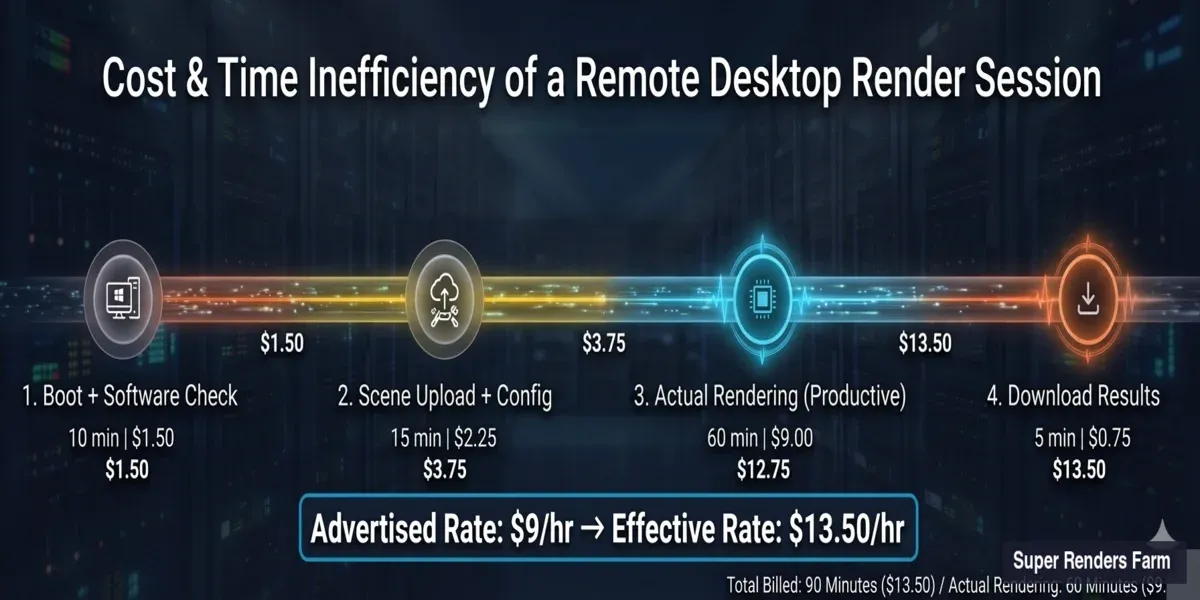 Ventilation du coût effectif d'une session de rendu sur bureau à distance — le tarif annoncé de 9 $/h atteint 13,50 $ effectif en incluant le démarrage, le téléversement et le téléchargement
Trois modèles côte à côte
| Facteur | Construction locale | Bureau à distance (IaaS) | Ferme cloud gérée |
|---|---|---|---|
| Coût matériel initial | 28 000 $–68 000 $ | 0 $ | 0 $ |
| Coût mensuel (100 h de rendu) | 3 500 $–4 500 $ (TCO amorti) | 900 $–1 350 $+ (tarif effectif) | 120 $–200 $ (tarif horaire) |
| Licences moteur de rendu | À votre charge (2 000 $–5 500 $/an) | À votre charge (vos sièges) | Incluses |
| Impact licences DCC | Aucun impact (nœuds dédiés) | Consomme vos sièges | Aucun impact (licences de la ferme) |
| Charge IT par mois | 20–40 heures | 10–20 heures | Minimale (soumission et téléchargement) |
| Temps de configuration par session | Unique (mais maintenance continue) | 30–60 min par session | Aucun (pré-configuré) |
| Contrôle du matériel | Total | Partiel (spécifications du fournisseur) | Aucun (géré par le fournisseur) |
| Évolutivité | Acheter du matériel supplémentaire | Louer plus de VMs | Automatique (la ferme s'adapte) |
| Adapté à | Studios avec 400+ h/mois, IT dédié, obligations de sécurité des données | Studios avec expertise DevOps, besoins de pipeline personnalisé, échelle 50+ nœuds | Studios de moins de 20 personnes, sans IT, volume de rendu variable |
Le bon choix dépend de la taille de votre équipe, de votre capacité technique et de votre volume de rendu. Chaque modèle correspond à un profil opérationnel différent — il n'y a pas de réponse universellement correcte.
Tableau de décision
| Facteur | Ferme locale favorisée | Rendu cloud favorisé |
|---|---|---|
| Heures de rendu mensuelles | 400+ de manière constante | Moins de 300 ou variable |
| Taille de l'équipe | 20+ avec IT dédié | 3–15 sans personnel IT |
| Schéma d'utilisation | Régulier et prévisible toute l'année | Saisonnier, par projet |
| Exigences sur les données | Air-gapped, sur site obligatoire | NDA standard suffisant |
| Modèle budgétaire | Grandes dépenses CapEx acceptables | Préférence OpEx, paiement à l'usage |
| Renouvellement du matériel | Accepte des cycles de dépréciation 3–4 ans | Veut un matériel de dernière génération |
| Staffing pipeline | TD ou administrateur IT dédié disponible | Pas d'ingénieur pipeline dans l'équipe |
| Licences moteur de rendu | Possède déjà des licences perpétuelles | Préfère les licences incluses |
Les studios qui rendent 150 à 300 heures par mois avec une variation saisonnière trouvent souvent qu'un modèle hybride fonctionne bien : les nœuds locaux gèrent les rendus de test itératifs tandis que l'infrastructure cloud monte en charge pour les deadlines de production finales. Pour en savoir plus sur l'évaluation des options de render farm cloud, consultez notre guide pour choisir une render farm cloud.
Pour comprendre comment les différentes render farms cloud facturent — et comment calculer le coût effectif par rapport aux tarifs annoncés sur six modèles tarifaires — consulte notre comparatif des modèles tarifaires render farm.
Coûts souvent négligés : tableau récapitulatif (ferme de 10 nœuds)
| Catégorie de coût | Fourchette annuelle | S'applique à |
|---|---|---|
| Licences moteur de rendu | 1 670 $–2 990 $ | Local + IaaS |
| Licences DCC (nœuds de rendu) | 0 $–2 500 $ | Local + IaaS |
| Électricité et climatisation | 4 800 $–10 000 $ | Local uniquement |
| Main-d'œuvre administration IT | 13 000 $–26 000 $+ | Local + IaaS |
| Gestion des plugins/versions | 2 000 $–5 000 $ | Local + IaaS |
| Gaspillage capacité inactive (60–75 %) | 60–75 % de la valeur matérielle | Local uniquement |
| Dépréciation matérielle | ~25 % annuellement (cycle 3–4 ans) | Local uniquement |
TCO annuel total pour une ferme locale de 10 nœuds : 42 000 $–54 000 $+ — avec la main-d'œuvre IT et la dépréciation du matériel comme les deux postes les plus importants. Le rendu cloud à utilisation équivalente (100 h/mois) revient à 1 440 $–2 400 $/an sur une plateforme entièrement gérée.
Consultez notre page de tarifs pour les tarifs actuels ; les achats de crédits bénéficient d'une remise sur volume automatique allant jusqu'à 30 %, sans code à saisir.
FAQ
Q: Combien coûte la construction d'une render farm de 10 nœuds en 2026 ? A: Une ferme CPU de 10 nœuds (double Xeon, 128 Go RAM par nœud) coûte 45 500 $–68 000 $ en matériel. Une ferme GPU de 5 nœuds avec des cartes RTX 5090 coûte 28 000 $–42 000 $ aux prix actuels du marché. Ces chiffres n'incluent pas les coûts récurrents comme les licences (2 000 $–5 500 $/an), l'électricité (4 800 $–10 000 $/an) ou la main-d'œuvre IT (13 000 $–26 000 $/an).
Q: Quel est le plus grand coût caché de l'exploitation d'une render farm locale ? A: Le temps d'administration IT. Les studios sous-estiment systématiquement les 5 à 10 heures par semaine nécessaires pour les mises à jour logicielles, les correctifs de pilotes, le dépannage des jobs, la gestion du stockage et la maintenance des serveurs de licences. À 50 $/heure, cela représente 13 000 $–26 000 $ par an — ce qui dépasse souvent le coût combiné de l'électricité et des licences.
Q: À quel moment la construction d'une render farm locale atteint-elle le seuil de rentabilité par rapport au rendu cloud ? A: Pour la plupart des studios, le point d'équilibre se situe autour de 400 heures de rendu mensuelles constantes en comparaison avec une ferme cloud entièrement gérée. En dessous de ce seuil, le rendu cloud est sensiblement moins cher quand vous incluez le coût total de possession complet — dépréciation du matériel, licences, électricité, climatisation et main-d'œuvre IT.
Q: Les moteurs de rendu nécessitent-ils des licences séparées pour chaque nœud de ferme ? A: Oui. V-Ray, Corona, Redshift, Arnold et Octane exigent tous une licence par nœud pour l'utilisation en render farm. Les coûts annuels varient de 140 $ à 415 $ par nœud selon le moteur et le niveau de tarification en volume. Il s'agit d'une dépense annuelle récurrente qui s'applique que le nœud soit en train de rendre ou en veille.
Q: Le rendu cloud est-il plus cher que l'utilisation de ma propre station de travail GPU ? A: Pour un rendu occasionnel (moins de 200 heures par mois), le rendu cloud est sensiblement moins cher quand vous tenez compte du coût total de possession. Une station de travail RTX 5090 unique coûte 5 000 $–8 000 $ à construire, plus 1 500 $–3 000 $ par an en électricité, licences et maintenance. Le rendu cloud à 50 heures par mois coûte environ 1 200 $/an sur une plateforme gérée avec toutes les licences incluses.
Q: Quelle est la différence entre le rendu cloud IaaS et le rendu cloud entièrement géré ? A: L'IaaS vous donne accès à du matériel distant — vous installez les logiciels, gérez les licences et résolvez vous-même les problèmes. Les fermes entièrement gérées incluent tous les logiciels, les licences de moteur de rendu et le support technique dans le tarif horaire. Le tarif horaire de l'IaaS semble plus bas, mais la charge opérationnelle (licences, configuration, débogage) ajoute généralement 3 000 $–8 000 $ par an en coûts cachés.
Q: À quelle vitesse le matériel d'une render farm se déprécie-t-il ? A: Le matériel de rendu GPU se déprécie d'environ 25 % par an, avec une durée de vie pratique de 3 à 4 ans avant que les performances ne soient significativement en retard sur les alternatives de la génération actuelle. Une ferme RTX 3090 construite en 2022 offre aujourd'hui environ un tiers du débit des nœuds RTX 5090 actuels dans les workloads de rendu GPU comme V-Ray GPU et Redshift.
Q: Puis-je adopter une approche hybride — matériel local et rendu cloud combinés ? A: Oui, et de nombreux studios trouvent que c'est le modèle le plus pratique. Utilisez vos stations de travail locales pour les rendus de test rapides et les aperçus de viewport, puis envoyez les images finales de production vers une ferme cloud. Cette approche maintient votre station de travail disponible pour le travail interactif, évite la dépense en capital de la construction d'une ferme complète, et vous permet d'augmenter la capacité de rendu pour les deadlines sans maintenir du matériel inactif toute l'année.
Q: La location d'un bureau à distance est-elle moins chère qu'une render farm gérée ? A: Le tarif horaire annoncé pour la location d'un bureau à distance est généralement plus bas, mais le coût effectif est plus élevé. Une session de bureau à distance à 9 $/h inclut du temps d'inactivité facturé pour le téléversement de scène, la configuration logicielle et le téléchargement post-rendu — transformant un rendu de 60 minutes en une session facturée de 90 minutes à 13,50 $ de tarif horaire effectif. Les fermes gérées facturent uniquement le temps de rendu réel, incluent toutes les licences logicielles et ne nécessitent aucune configuration par session. Pour les studios rendant moins de 300 heures par mois, le coût total d'une ferme gérée est généralement inférieur à celui de la location d'un bureau à distance quand vous tenez compte des licences, de la charge de configuration et des sièges DCC perdus.
Q: Ai-je besoin de mes propres licences logicielles pour rendre sur une render farm cloud ? A: Cela dépend du type de service de rendu cloud. Sur un bureau à distance ou une plateforme IaaS, oui — vos propres licences DCC et de moteur de rendu occupent la machine distante, réduisant les sièges disponibles pour les artistes locaux. Sur une render farm cloud entièrement gérée, non — la ferme fournit son propre pool de licences pour les moteurs de rendu pris en charge (V-Ray, Corona, Redshift, Arnold, et autres). Vos licences locales restent disponibles pour le travail interactif pendant que la ferme gère le rendu avec sa propre pile logicielle.
About Alice Harper
Blender and V-Ray specialist. Passionate about optimizing render workflows, sharing tips, and educating the 3D community to achieve photorealistic results faster.



