How Render Farms Work: A Technical Guide for 3D Artists
Overview
Introduction
Render farms exist because single workstations hit hard limits. A 500-frame animation at 20 minutes per frame takes nearly a week on one machine. Distribute those frames across 100 machines, and the same job finishes in under two hours. The math is straightforward — the engineering behind it is not.
We operate a render farm with over 20,000 CPU cores and a dedicated GPU fleet running NVIDIA RTX 5090 cards. Every day, we process hundreds of jobs across V-Ray, Corona, Arnold, Redshift, Cycles, and other engines. This guide explains what actually happens between the moment you upload a scene file and the moment you download finished frames — the queuing systems, the file distribution, the error handling, and the infrastructure decisions that make distributed rendering reliable at scale.
If you're new to the concept of render farms entirely, our guide to what a render farm is covers the fundamentals. This article goes deeper into the technical mechanics. For a primer on what rendering is and the pipeline behind it, our complete rendering guide covers the fundamentals from geometry to final pixel.
What Happens When You Submit a Render Job
The submission process involves more steps than most artists realize. Here's the sequence, from your workstation to the first rendered pixel.
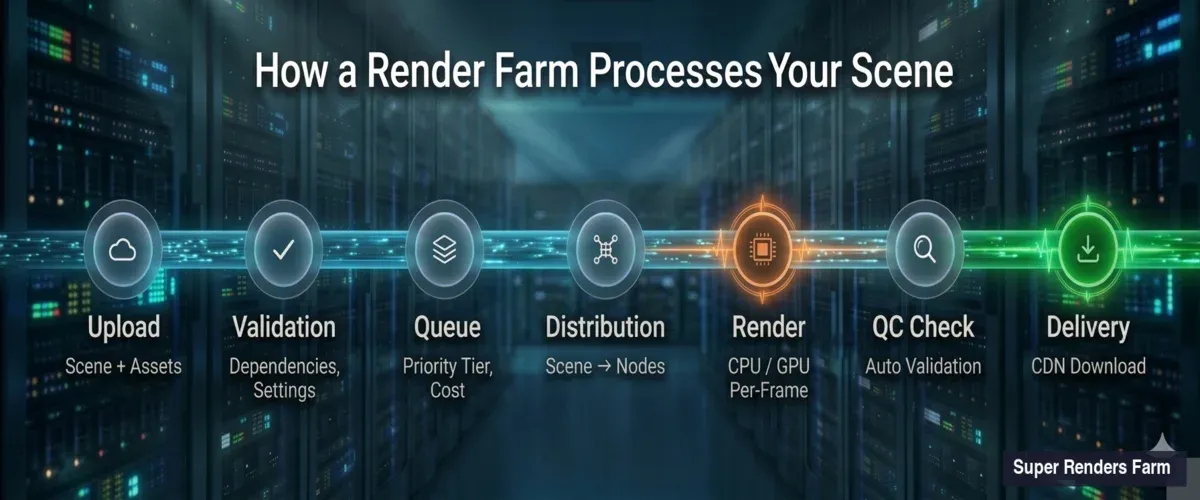
Render farm pipeline showing 7 stages from scene upload through validation, queuing, distribution, rendering, quality check, to final delivery
Scene upload and parsing. When you submit a .max, .blend, .ma, or other scene file, the farm's ingestion system unpacks it and catalogs every dependency — textures, caches, proxy meshes, HDRI maps, plugin assets. Missing dependencies are the single most common cause of failed renders. Our system flags missing files before your job enters the queue, so you can fix paths rather than waste render time on black frames.
Render settings validation. The farm reads your embedded render settings: engine type, version, resolution, frame range, output format, sampling parameters. It cross-references these against available node configurations. If you've specified V-Ray 7 but the scene was saved in V-Ray 6 format, the system catches this mismatch before rendering begins.
Cost estimation. Based on scene complexity, resolution, sample counts, and historical data from similar jobs, the system generates a time and cost estimate. This isn't guesswork — we've processed enough jobs to build statistical models that predict render time within a reasonable margin for most standard scenes.
Job Queuing and Priority Systems
Once validated, your job enters a queue. How render farms manage this queue determines whether you get frames in two hours or twelve.
Priority tiers. Most farms offer multiple priority levels. Higher-priority jobs get access to more nodes simultaneously and can preempt lower-priority work. On our farm, the difference between standard and high-priority is significant — a 200-frame job might render on 20 nodes at standard priority versus 80 nodes at high priority.
Fair scheduling. The queue manager balances resources across all active users. No single job monopolizes the entire farm, even at high priority. If the farm has 400 available CPU nodes and three high-priority jobs are running simultaneously, the scheduler distributes nodes proportionally based on job size, estimated completion time, and user tier.
Preemption and requeuing. When a high-priority job arrives and the farm is at capacity, the scheduler may pause frames from lower-priority jobs and reassign those nodes. Paused frames re-enter the queue automatically — no work is lost, though lower-priority jobs take longer to complete.
Dead node detection. If a render node stops responding (hardware failure, driver crash, network timeout), the queue manager detects the silence within seconds and reassigns that node's in-progress frames to healthy nodes. This happens transparently — you never see the failure in your output.
Scene Distribution: How Files Get to Render Nodes
Before a node can render frame 47 of your animation, it needs your entire scene — geometry, textures, caches, and configuration. Moving this data efficiently is a core infrastructure challenge.
Network file systems. Most production render farms use high-speed shared storage (NFS, SMB, or proprietary distributed file systems) rather than copying scene files to each node individually. The scene lives on a central storage cluster, and render nodes access it over the network. This avoids the bottleneck of copying a 50 GB scene to 100 nodes sequentially.
Caching and locality. Smart farms cache frequently accessed assets locally on render nodes. If three jobs today use the same HDRI pack or the same V-Ray material library, nodes that already have those files cached skip the network transfer. This reduces startup time per frame from minutes to seconds for repeat textures.
Texture streaming. For scenes with massive texture sets (common in archviz with 4K+ material libraries), some farm configurations stream textures on demand rather than preloading everything. The render engine requests a texture tile, the storage system delivers it, and the node caches it locally for subsequent frames. This trades slightly higher per-tile latency for significantly lower initial load time.
The Rendering Phase: CPU and GPU Processing
With the scene loaded and the frame assigned, the actual rendering begins. How farms allocate CPU versus GPU resources reflects real performance and cost trade-offs.
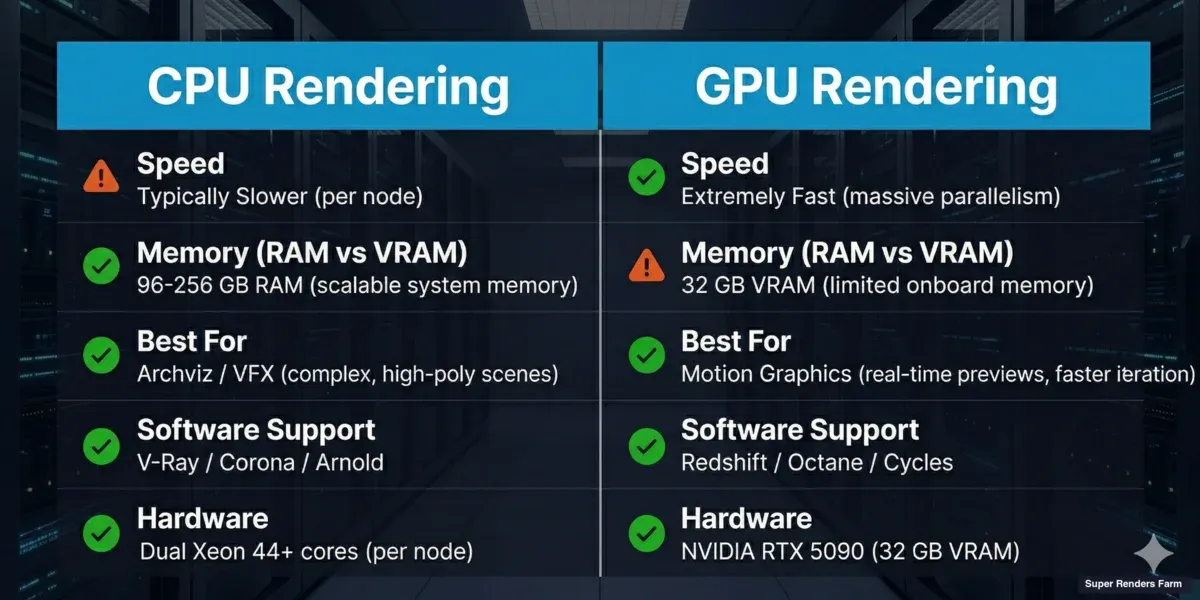
CPU rendering vs GPU rendering comparison showing differences in speed, memory, best use cases, supported software, and hardware specs
CPU rendering. CPU-based engines (V-Ray CPU, Corona, Arnold CPU) distribute work across all available cores on a node. A typical farm CPU node has 44 or more cores with 96–256 GB of RAM. The large memory pool means CPU nodes handle scenes that would overflow a GPU's VRAM — complex archviz interiors with displacement maps, particle simulations with millions of elements, or volumetric effects with high-resolution caches.
On our farm, approximately 70% of render jobs run on CPU nodes. This reflects the archviz and VFX production workflows that dominate professional rendering — these scenes tend to be memory-heavy and use engines like V-Ray and Corona that are optimized for multi-core CPU performance.
GPU rendering. GPU-based engines (Redshift, Octane, V-Ray GPU, Cycles with OptiX) leverage the thousands of parallel cores on modern graphics cards. Our GPU nodes use NVIDIA RTX 5090 cards with 32 GB VRAM. GPU rendering is typically faster per frame for scenes that fit within VRAM limits, but those limits are real — a scene requiring 40 GB of texture and geometry data cannot render on a 32 GB card without out-of-core fallbacks that reduce performance.
Hybrid allocation. Some jobs benefit from splitting across both CPU and GPU nodes. A common pattern: GPU nodes handle beauty passes (fast per frame, VRAM-constrained), while CPU nodes process volumetric or particle passes that exceed VRAM capacity. The farm's job scheduler supports this split, routing different render layers to appropriate hardware.
Frame Assembly and Quality Checking
Rendering a frame is only half the job. The farm must also verify output quality and assemble frames into a coherent delivery package.
Automatic quality checks. After each frame renders, the farm runs basic validation: file size within expected range (a 1-byte PNG means the render failed silently), resolution matches specification, no fully black or fully white frames (common indicators of missing lights or materials), and output format is correct. Frames that fail these checks are automatically re-rendered on a different node.
Frame stitching for tile-based rendering. Some engines and configurations split a single high-resolution frame into tiles — rendering the top-left quarter on one node, the top-right on another, and so on. After all tiles complete, the farm stitches them into the final full-resolution image. This approach works well for extremely high-resolution stills (8K+) where a single node would take hours per frame.
Output delivery. Completed frames are written to the farm's output storage and made available for download. We use cloud storage with CDN acceleration to ensure download speeds aren't bottlenecked by the farm's upload bandwidth. For large animation sequences (thousands of EXR files), we offer bulk download options and can compress sequences for faster transfer.
Network Architecture of a Render Farm
The infrastructure connecting render nodes, storage, and management systems is as important as the hardware itself.
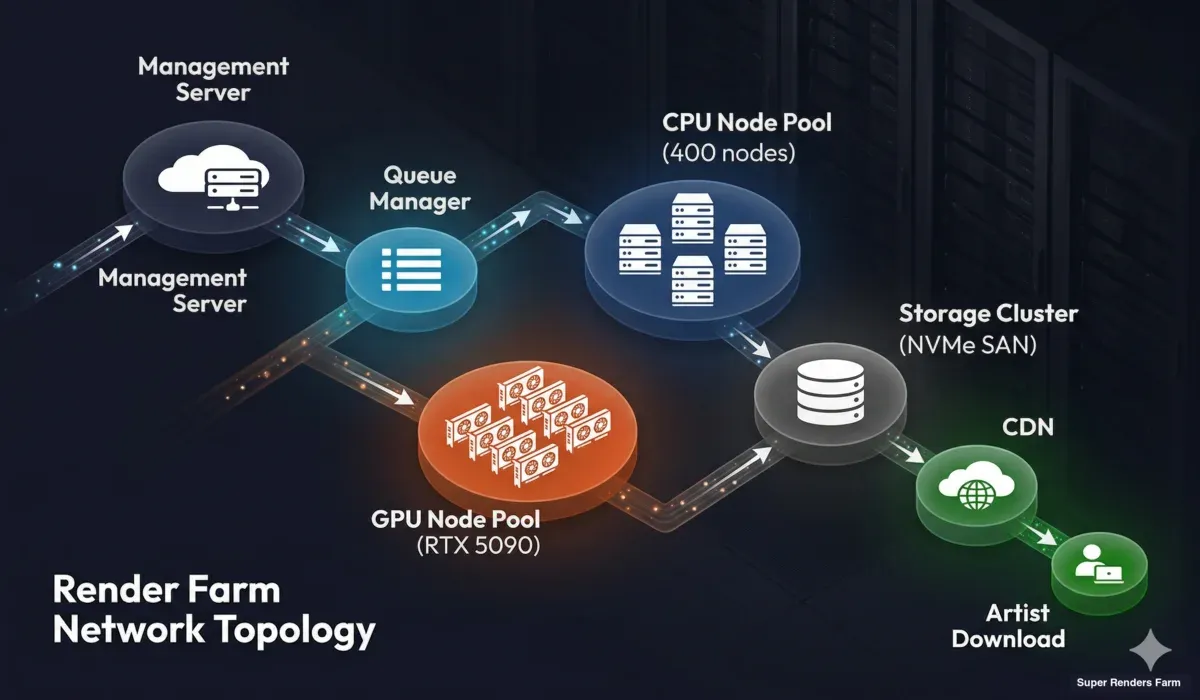
Render farm network topology showing management server, queue manager, CPU and GPU render node pools, storage cluster, and CDN delivery to users
Management layer. A central management server orchestrates everything — job ingestion, queue management, node health monitoring, and user communication. This server is redundant (failover-capable) because if it goes down, the entire farm stops accepting and processing jobs.
Render node network. Nodes communicate with management and storage over a high-bandwidth internal network. On modern farms, this is typically 10 Gbps Ethernet or faster. Bandwidth matters most during scene distribution (loading textures) and frame output (writing high-resolution EXR files to storage).
Storage cluster. Central storage is the shared resource that every render node reads from and writes to. It must handle simultaneous reads from hundreds of nodes requesting texture tiles and simultaneous writes from nodes outputting rendered frames. High-performance storage arrays (NVMe-based SANs or distributed file systems) are essential. A slow storage system creates a bottleneck that no amount of CPU or GPU power can overcome.
Internet connectivity. The farm's connection to the outside world determines how fast users can upload scenes and download results. Redundant multi-gigabit connections are standard for production farms. Geographic proximity to major user bases also matters — a farm in the US serving a European client will have higher latency than one with a European point of presence.
Monitoring and Error Recovery
Things fail constantly at scale. A farm with hundreds of nodes expects daily hardware incidents. The difference between a reliable farm and an unreliable one is how failures are detected and handled.
Node health monitoring. Every render node reports its status (CPU temperature, memory usage, GPU utilization, disk space, network throughput) to the management system at regular intervals. Nodes that miss check-ins are flagged immediately. Nodes showing abnormal patterns (rising temperature, declining throughput) are preemptively removed from the pool before they fail mid-render.
Frame-level recovery. When a node crashes during rendering, the frame it was processing is marked as failed and reassigned to a healthy node. The farm tracks which frames have been successfully completed versus which are in progress or failed. This state tracking ensures that no frame is lost or duplicated, even during cascading node failures.
Render engine crash handling. Beyond hardware failures, render engines themselves can crash — out-of-memory conditions, corrupted scene elements, or engine bugs. The farm distinguishes between recoverable crashes (retry on a different node with more RAM) and non-recoverable ones (the scene file itself has an error that will crash every node). After a configurable number of retries, the farm reports the failure to the user with diagnostic information rather than endlessly retrying.
Data integrity. Rendered frames are checksummed during write. If a network glitch corrupts a frame during transfer to storage, the checksum mismatch triggers an automatic re-render. This is particularly important for EXR files, where a single corrupted byte can produce visible artifacts in compositing.
Beyond the generic queue + dispatcher + node-monitor stack, each renderer adds its own toolchain that has to mesh with the farm's job scheduler — license check-out behavior, AOV pass writers, and CPU-vs-GPU mode selection are all renderer-specific. Arnold is a useful canonical example because it spans Maya (MtoA), 3ds Max (MAXtoA), and Cinema 4D (C4DtoA); our Arnold renderer cloud render farm guide walks through how those toolchains interact with a managed farm's scheduling and storage layer.
Render Farm Software Stack
The software that coordinates all of this is as critical as the hardware.
Render managers. Purpose-built render management software handles job scheduling, node allocation, and farm administration. These systems are designed for the specific demands of distributed rendering — frame-level dependency tracking, per-node engine version management, and multi-user resource allocation.
Scene analysis tools. Before a job enters the render queue, analysis tools parse the scene file to identify dependencies, estimate resource requirements, and check for common errors. These tools are engine-specific — a V-Ray scene analyzer checks for different issues than a Blender Cycles analyzer.
Version management. A production farm maintains multiple versions of each render engine simultaneously. One user may need V-Ray 6 for an older project while another requires V-Ray 7. The farm's software infrastructure ensures each node loads the correct engine version for its assigned job, switching between versions as different jobs cycle through.
Monitoring dashboards. Farm operators use real-time dashboards showing node status, queue depth, active jobs, completion rates, and error frequencies. These dashboards enable rapid response to issues — if error rates spike on a particular node group, the operator can investigate immediately rather than discovering the problem hours later.
How Fully Managed Farms Differ from Self-Service Platforms
Not all render farms work the same way. The two main categories — fully managed and self-service — handle the pipeline differently.
Before the side-by-side comparison, our primer on what a fully managed render farm actually does covers the upload-and-deliver model that defines the managed category.
Fully managed farms (like Super Renders Farm) handle the entire technical stack. You upload a scene, select your settings, and the farm manages everything: software installation, version management, plugin compatibility, error recovery, and output delivery. You don't remote into any machine or manage any infrastructure. This matters because render engine configuration is complex — V-Ray alone has dozens of version-specific settings that affect farm compatibility.
Some teams prefer to render without remote desktop access and leave orchestration entirely to the farm; others want direct access via RDP or SSH — the managed-vs-DIY comparison covers both sides.
Self-service or IaaS platforms rent you virtual machines with rendering software pre-installed. You remote in, configure the software yourself, manage your own render queue, and handle troubleshooting. This gives more control but requires significantly more technical expertise and time investment.
For a detailed comparison, our managed vs DIY cloud rendering guide breaks down the trade-offs.
If you are evaluating which render farm fits your production needs, our render farm selection guide walks through eight practical criteria — from plugin compatibility to security policies.
The Cost Structure Behind Render Farm Pricing
Understanding how render farms work also means understanding what you're paying for.
Per-resource pricing. Most farms charge based on compute resources consumed — GHz-hours for CPU rendering or OBs (compute units) for GPU. You can estimate costs before committing using tools like our cost calculator. This means your cost scales linearly with how many resources your job uses. A 10-minute frame on one node costs the same whether the farm has 10 other jobs running or 1,000 — you pay for what you consume.
Infrastructure overhead. The render farm price per GHz-hour includes not just the electricity to run the CPU, but amortized hardware costs, storage infrastructure, network bandwidth, software licensing (render engine farm licenses are expensive), cooling, redundancy, and the engineering team that keeps everything running. A meaningful portion of the cost covers the reliability and convenience layer that saves you from managing this infrastructure yourself.
Priority multipliers. Higher priority costs more because it grants access to more nodes simultaneously, which means other jobs yield resources. This is a deliberate trade-off — urgent deadlines justify the premium.
For a comprehensive pricing breakdown, see our render farm pricing guide.
Summary: The Render Farm Pipeline
The full pipeline, from submission to delivery:
- Upload — scene file and dependencies transferred to farm storage
- Validation — dependencies checked, render settings verified, cost estimated
- Queue — job enters priority-based queue, waits for node allocation
- Distribution — scene data made available to assigned render nodes via network storage
- Render — CPU or GPU nodes process assigned frames in parallel
- Quality check — each frame validated (file size, resolution, content)
- Assembly — frames organized, tiles stitched if applicable
- Delivery — completed frames available for download via CDN-accelerated storage
Each step has failure modes, and each failure mode has automated recovery. The result is a system that reliably converts your scene files into rendered frames at speeds that no single workstation can match.
FAQ
Q: How long does it take a render farm to process a typical animation job? A: It depends on frame complexity and priority level. A 500-frame archviz animation at 1080p with V-Ray typically completes in 2–6 hours on a farm versus 3–7 days locally. GPU-accelerated jobs (Redshift, Cycles) are often faster per frame but constrained by VRAM for complex scenes.
Q: What happens if a render node crashes during my job? A: The farm's queue manager detects the failure within seconds and reassigns the in-progress frame to a healthy node. No frames are lost. If the crash was caused by a scene error (not hardware), the system retries on a different node configuration before flagging it as a user-side issue.
Q: Do I need to install render software on the farm myself? A: On fully managed farms like Super Renders Farm, no. We maintain all supported render engines (V-Ray, Corona, Arnold, Redshift, Cycles, and others) across our node fleet, including multiple versions for compatibility. Self-service platforms may require you to manage software installation yourself.
Q: Can a render farm handle scenes that exceed my local GPU's VRAM? A: Yes. CPU render nodes on our farm have 96–256 GB of RAM, which can handle scenes that would overwhelm a workstation GPU. For GPU-specific engines, our RTX 5090 nodes provide 32 GB VRAM — more than most desktop GPUs. Scenes exceeding even that are routed to CPU nodes automatically.
Q: How does the farm handle different render engine versions? A: Production farms maintain multiple versions of each engine simultaneously. When you submit a job, the system matches your scene's engine version to compatible nodes. If you saved your scene in V-Ray 6, it renders on V-Ray 6 nodes — not V-Ray 7, which might interpret settings differently.
Q: Is my scene data secure on a render farm? A: Reputable farms use encrypted transfers (TLS/SSL for upload and download), access-controlled storage (your files are isolated from other users), and automatic deletion of scene data after a retention period. On our farm, scene files are purged automatically after job completion plus a configurable retention window.
Q: What file formats should I use when submitting to a render farm?
A: Use your DCC's native format (.max for 3ds Max, .blend for Blender, .ma/.mb for Maya). For output, specify EXR for compositing workflows or PNG for delivery. Always render to image sequences, not video files — if a frame fails, only that frame needs re-rendering.
Q: How do render farms handle plugin dependencies like Forest Pack or Scatter? A: Managed farms maintain common plugins across their node fleet. When you submit a scene using Forest Pack, the farm ensures nodes assigned to your job have the correct Forest Pack version installed. Less common plugins may require advance notice so the farm can deploy them before your job runs.
Further Reading
- What Is a Render Farm? — foundational guide to render farm concepts
- Render Farm Pricing Guide — how pricing models work across the industry
- Cloud vs Local Rendering — when farm rendering makes sense versus local
- Managed vs DIY Cloud Rendering — fully managed versus self-service comparison
- Autodesk Knowledge Network — Distributed Rendering — official 3ds Max distributed rendering docs
- Blender Manual — Render Output — Blender render output configuration
About Thierry Marc
3D Rendering Expert with over 10 years of experience in the industry. Specialized in Maya, Arnold, and high-end technical workflows for film and advertising.