
Eevee vs Cycles: When Each Wins on a Cloud Farm
Overview
Introduction
Eevee and Cycles are not rivals — they solve different problems inside the same Blender file. Choosing between them is rarely about which engine is "better." It is about which one fits the work in front of you: a quick previz pass, a 600-frame animation, a single hero still, or a stylised look that does not need ray tracing.
We render Blender jobs every day at Super Renders Farm, and the engine split we see in production is roughly 70/30 in favour of Cycles for final-quality work, with Eevee dominating preview rounds and stylised animation. But the two engines behave very differently once you take them off a single workstation and onto a cloud farm. Eevee is fast on one machine and stays roughly fast on more. Cycles starts slower and then keeps getting faster as you add GPUs. That single distinction shapes most of the practical decisions in this guide.
This article walks through what each engine actually does in Blender 4.x, where Eevee Next and Cycles X land in 2026, the real-world workflows each one suits, and how their cost and time behaviour shifts when you offload to a cloud render farm for Blender. The goal is not to declare a winner. The goal is to give you a clear rule for when to switch.
Eevee Next and Cycles X in 2026
Both engines went through major upgrades that landed in Blender 4.2 LTS and have been refined through 4.3 and 4.4. Eevee Next is a full rewrite of the Eevee rasteriser that introduced screen-space global illumination, virtual shadow maps, and improved volumetrics. Cycles X — the unified Cycles architecture maintained since 2021 — continues to receive scheduling improvements, light tree optimisations, and OptiX denoiser updates documented in the Cycles documentation.
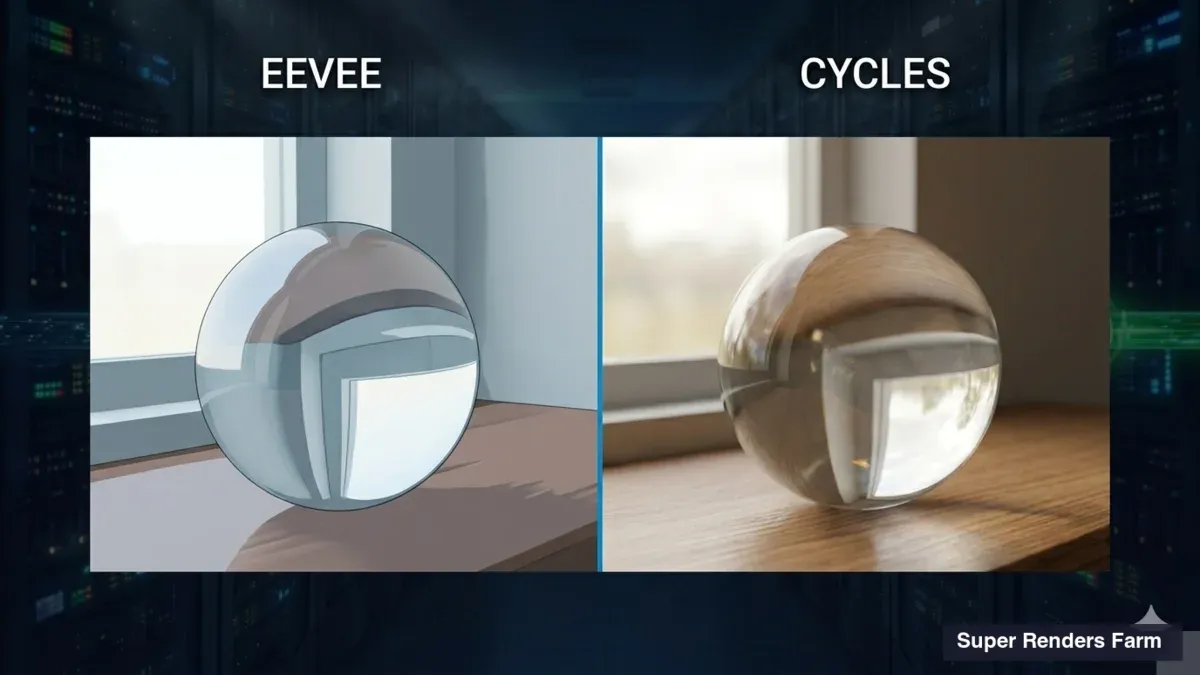
The fundamental difference has not changed: Cycles is a physically based path tracer that traces rays through a scene to compute how light scatters; Eevee is a real-time rasteriser that approximates the same lighting using clever screen-space tricks. Path tracing produces accurate caustics, refractions, and global illumination. Rasterisation produces fast images that look correct most of the time and break down at the edges — mirror reflections of off-screen objects, accurate refractive glass, and complex caustics are still hard for Eevee, even after the Next rewrite.
For the typical Blender user in 2026, the practical model is: Cycles is your final-frame engine, Eevee is your iteration engine. The cloud farm shifts that boundary but does not erase it. Across the jobs we process at Super Renders Farm, the engine flag in the submission metadata correlates almost perfectly with the project type — Cycles for archviz and product, Eevee for motion design and previz.
If you are weighing engines beyond these two, our 2026 comparison of Blender render engines puts Cycles and Eevee next to the third-party options.
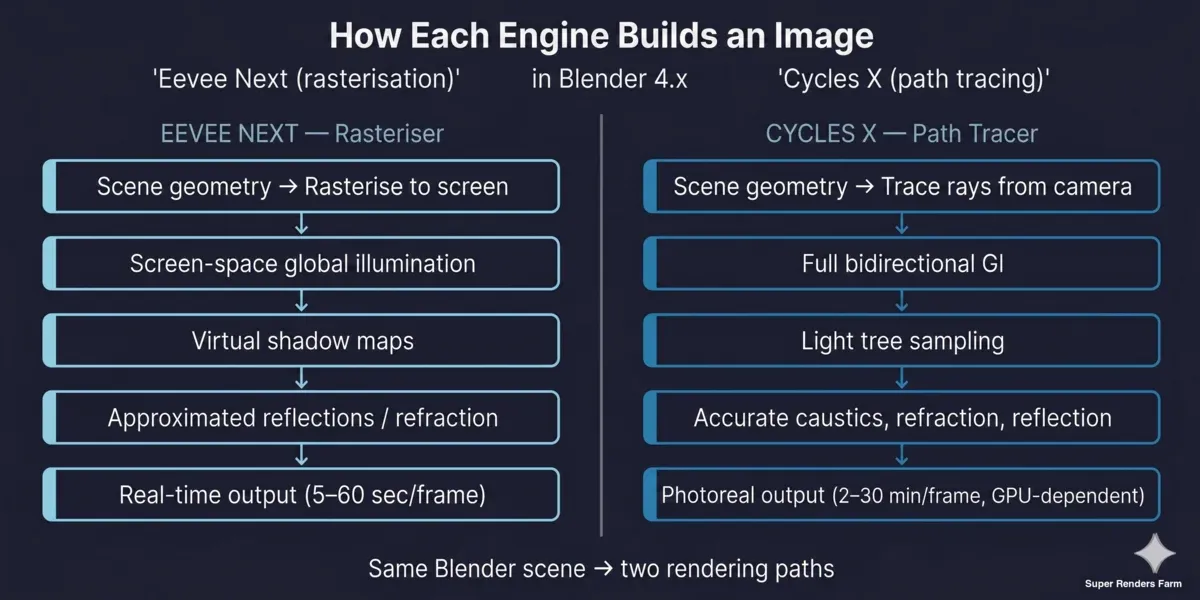 Eevee Next vs Cycles X feature comparison diagram showing the rasteriser path versus the path-tracer path through Blender 4.x
When Eevee Wins
Eevee is the right tool when speed-per-frame matters more than physical accuracy. The clearest cases:
- Animatics and previz. A 300-frame previz at 1080p that renders in 12 seconds per frame on a single workstation is something Eevee can do without breaking a sweat. Cycles cannot match that turnaround on the same hardware.
- Stylised and NPR work. If your shading is anime-style, painterly, or matte-shaded, you do not need accurate caustics. Eevee renders these looks beautifully and faster.
- Motion graphics with controlled lighting. Logo reveals, abstract type-in-3D, and product turntables under HDRI lighting all sit comfortably inside Eevee's strengths. Screen-space reflections and bloom usually carry the look.
- Real-time-style cinematics. Game cinematic mockups and Unreal-adjacent looks are Eevee territory because the engine is tuned to behave like a game renderer.
- Animation passes where you can fake what is missing. If your scene has no glass, no caustics, no off-screen reflective surfaces, and no extreme depth-of-field, Eevee can be your final engine — not just your previz.
We have shipped final animation jobs for clients at Super Renders Farm where the entire 1,200-frame sequence rendered in Eevee. The lighting was carefully designed around Eevee's strengths: HDRI-driven, no clear glass, and screen-space ambient occlusion handled the contact shadows. The frame budget was 90 seconds per frame instead of 14 minutes per frame in Cycles. That is the kind of decision Eevee makes possible.
When Cycles Wins
Cycles is the right tool when the image needs to be physically correct. The clearest cases:
- Architectural visualisation interiors. Interior light bouncing through windows, glass, mirrors, and indirect illumination is what path tracing exists for. Eevee Next has improved here with screen-space GI but still cannot match Cycles for accurate interior bounce light.
- Product renders with refractive material. Glass bottles, jewellery, watches, and any scene where caustics and accurate refraction are part of the read.
- VFX and photoreal compositing. When a render needs to integrate cleanly with live-action plates, Cycles produces the linear, physically grounded data that compositors expect.
- Stills where time per frame is acceptable. A single hero frame at 4K with 1,024 samples and full denoising is a Cycles job. The render might take 40 minutes locally and 4 minutes on a cloud GPU farm — but Eevee cannot produce that image at that quality regardless of time.
- Animation where photorealism is non-negotiable. Long-form Cycles animation is expensive on a single workstation. This is where the cloud farm changes the calculus.
The pattern is consistent across our fleet: jobs that arrive flagged for Cycles tend to be archviz, product, and VFX. Jobs flagged for Eevee tend to be motion design, animatics, and stylised animation. Both engines are valid; the work decides.
Feature Matrix
| Feature | Eevee Next (Blender 4.x) | Cycles X (Blender 4.x) |
|---|---|---|
| Rendering technique | Real-time rasterisation | Physically based path tracing |
| Global illumination | Screen-space, approximated | Full bidirectional path tracing |
| Caustics | Limited / approximated | Accurate (with caustics enabled) |
| Refraction | Screen-space, breaks at edges | Physically accurate |
| Reflections | Screen-space (off-screen reflections fail) | Full ray-traced |
| Hair / fur | Strand-based, approximate shading | Full path-traced strands |
| Volumetrics | Improved in Eevee Next | Physically accurate |
| Hardware target | GPU (rasterisation) | GPU + CPU (path tracing) |
| Denoising | Built-in temporal denoiser | OpenImageDenoise + OptiX |
| Frame time (typical 1080p) | 5–60 sec | 2–30 min |
| Cloud GPU scaling | Flat — per-frame is already fast | Linear — more GPUs cut wall-time proportionally |
| Use case | Previz, motion design, stylised work | Archviz, product, VFX, photoreal |
Cloud Render Farm: Why Cycles Scales Better
This is where the workflow conversation usually shifts. On a single workstation, the choice between Eevee and Cycles is shaped by per-frame time. On a cloud farm, the conversation is about how each engine behaves when you throw more hardware at it.
For the broader fundamentals of that conversation, how cloud rendering works and what it costs, see our cloud rendering explained guide.
Cycles is embarrassingly parallel at the frame level. Each frame is an independent path-tracing job, and OptiX-accelerated denoising on modern GPUs (RTX 4090, RTX 5090) is fast enough that the bottleneck is usually sample count, not denoise. Distribute 600 frames across a GPU cloud render farm with twenty available GPUs, and the wall-time drops by roughly the GPU count. A 12-hour local Cycles job becomes a 30-minute farm job. That linear relationship is the entire commercial argument for putting Cycles on a farm.
Eevee scales differently. Per-frame time is already low — often under a minute — and the engine is GPU-bound on a single device. Distributing Eevee frames across a farm helps if you have thousands of frames, but the relative speed-up is less dramatic because you were not waiting hours per frame to begin with. The economics still favour the farm for long Eevee sequences (10,000+ frames on stylised animation), but the urgency is lower than for Cycles work.
Tile-based denoising is part of the story. Cycles in Blender 4.x can denoise across frames and across tiles in a way that benefits from more GPU memory and more cores. A 32 GB RTX 5090 GPU running Cycles X with OptiX denoising will resolve a noisy interior at 256 samples in roughly the same time a 24 GB GPU resolves it at 1,024 samples. Cloud farms with current-generation GPUs let you trade samples for time without sacrificing image quality.
We see the same pattern in our Blender cloud rendering guide: clients who switch from local Cycles rendering to a Blender cloud render farm usually report time savings of 10–30× on animation, with cost-per-frame settling somewhere between $0.10 and $0.60 depending on resolution, samples, and engine settings — published rates and a calculator are on our pricing page.
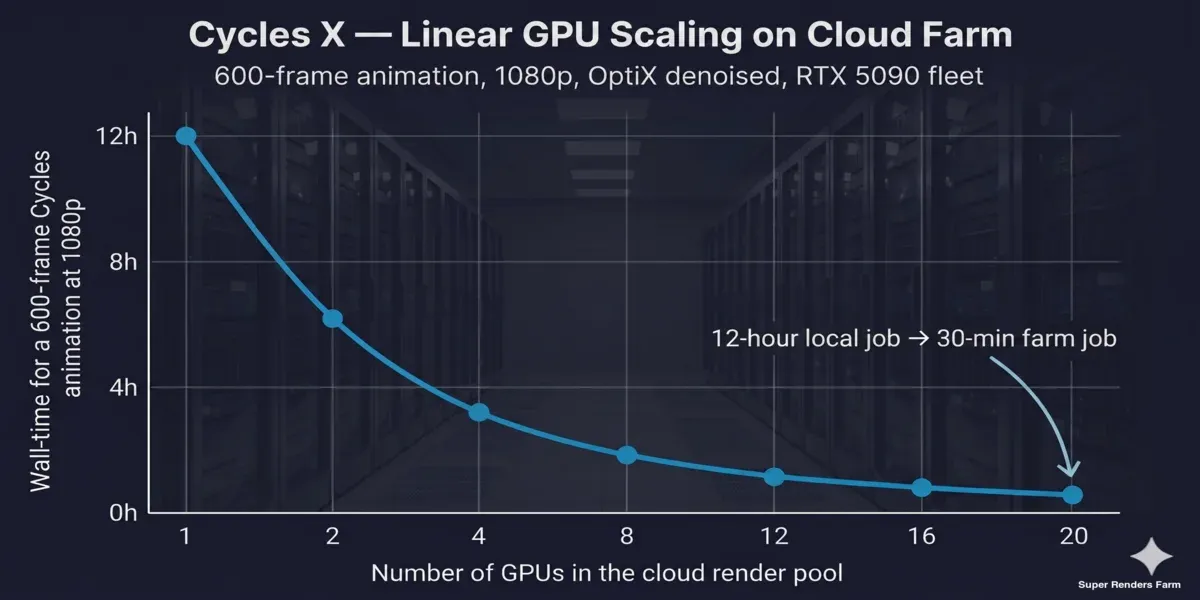 Cycles X linear GPU scaling chart on cloud render farm infrastructure showing wall-time reduction from 1 to 20 GPUs
Picking Your Engine
A simple decision framework works for most Blender projects:
- Still or long animation? Stills tolerate longer per-frame time; animation magnifies it. Long Cycles animation needs a farm.
- Does the image require accurate caustics, refraction, or interior GI? If yes, Cycles. If no, Eevee is in play.
- What is the deadline shape? A two-week archviz deliverable can take Cycles locally. A two-day deliverable needs the farm or needs Eevee.
- Compositing with live action? Cycles, almost always.
- Stylised, NPR, or game-cinematic look? Eevee, almost always.
The rule we share with clients at Super Renders Farm: design the look around your render budget, not the other way around. If your budget is local-only, Eevee may be the right artistic choice even when Cycles is technically ideal. If a cloud farm is in your pipeline, Cycles becomes a viable default for any project that benefits from physical accuracy.
FAQ
Q: Is Eevee Next a different engine from regular Eevee? A: Eevee Next is a full rewrite of the Eevee rasteriser introduced in Blender 4.2 LTS. It uses a new compositor-based pipeline, virtual shadow maps, and screen-space global illumination. It is the default Eevee in Blender 4.2 and later — there is no separate "regular" Eevee anymore in current Blender releases.
Q: Can I use Cycles for animation if I do not have a render farm? A: Yes, but plan for long render times. A 600-frame Cycles animation at 1080p can take 40–80 hours on a single high-end workstation. The same job typically completes in 1–4 hours on a cloud GPU farm. Local Cycles animation is realistic for short sequences or low resolution; long-form work usually moves to a farm.
Q: Which engine produces higher-quality images? A: For physically accurate output — interiors with bounce light, refractive materials, accurate caustics — Cycles is the higher-quality engine because it path-traces light. For stylised, motion-design, or game-cinematic looks, image quality is a matter of taste and Eevee can produce equally finished results faster. The question of how to make Blender render at higher quality usually comes down to picking the right engine for the look, not pushing the wrong engine harder.
Q: Does Eevee benefit from a cloud render farm? A: It can, especially for long animation sequences (thousands of frames) where parallelising frames across machines saves hours. But the per-frame speed-up is smaller than for Cycles because Eevee frames are already fast. The cloud value for Eevee is throughput on long animation, not raw speed on individual frames.
Q: What samples count do I need in Cycles for a clean render? A: With OptiX denoising in current Blender versions, most production scenes resolve cleanly at 256–512 samples for stills and 128–256 for animation. Interior scenes with strong indirect lighting may need 1,024 or more. The denoiser does most of the heavy lifting — pushing beyond 1,024 rarely improves quality enough to justify the time.
Q: Do Cycles and Eevee produce the same colours and lighting? A: They aim to be visually consistent in Blender 4.x, but small differences remain. Cycles is the reference for physically based output. Eevee Next has narrowed the gap significantly with screen-space GI and improved volumetrics, but matching a Cycles look exactly in Eevee still requires shader and lighting adjustments.
Q: Can I render the same Blender scene in both engines? A: Yes — most modern shaders and lights work in both. Some node setups (specific procedural textures, complex volume shaders, displacement) behave differently between engines. The Blender Studio's benchmark scenes are useful as cross-engine test files because they have been built to work in both.
Q: Which engine is better for archviz? A: Cycles, in almost every case. Architectural interiors depend on accurate light bouncing through windows, glass, and reflective surfaces — all areas where path tracing produces results Eevee cannot match. Eevee can be useful for fast client-review previews during the design phase, but the final delivery is almost always Cycles.
About Alice Harper
Blender and V-Ray specialist. Passionate about optimizing render workflows, sharing tips, and educating the 3D community to achieve photorealistic results faster.



