FumeFX Eğitimi: Modern VFX için Gerçekçi Ateş ve Duman Simülasyonu Rehberi
Genel bakış
1. FumeFX Modern VFX'te Neden Hâlâ Önemli?
Bir FumeFX eğitimine başlıyorsanız, muhtemelen yalnızca bir aracı öğrenmeye çalışmıyorsunuz; gerçekten inandırıcı görünen efektler yaratmaya çalışıyorsunuz.
Modern VFX'te her şey gerçekçiliğe bağlıdır. İster sinematik bir patlama ister ince bir ortam dumanı olsun, izleyiciler bir şeyin yanlış göründüğünü anında fark eder. FumeFX tam da burada devreye girer.
FumeFX yıllardır güncelliğini koruyor, çünkü sanatçılara kritik bir şey sunuyor:
👉 Houdini gibi tam kapsamlı bir prosedürel sistem gerektirmeden, fiziksel tabanlı ateş ve duman davranışı üzerinde kontrol
Hazır efektlere güvenmek yerine şunları simüle edersiniz:
- Isının nasıl yükseldiğini
- Dumanın nasıl yayıldığını
- Ateşin yakıtı nasıl tükettiğini
Ve bu, gerçekçilik açısından tamamen farklı bir seviyedir.
2. FumeFX'in Gerçekte Ne Yaptığını Anlamak (Temellerin Ötesinde)
İlk bakışta FumeFX sıradan bir simülasyon plugin'i gibi görünebilir. Ancak kaputun altında, basit parçacık sistemlerinden çok farklı çalışır.
2.1 Parçacık Değil, Hacim Olarak Simülasyon
Parçacık tabanlı araçların aksine FumeFX, bir voxel grid sistemi üzerinde çalışır.
Şöyle düşünün:
FumeFX, tek tek parçacıkları izlemek yerine küçük 3D hücrelerin içinde olup bitenleri izler:
- Sıcaklık
- Duman yoğunluğu
- Hız
Bu yaklaşım şunları mümkün kılar:
- Akıcı, kesintisiz hareket
- Duman ve ateşin doğal biçimde birbirine karışması
- Kuvvetler arasında daha gerçekçi etkileşim
2.2 FumeFX'i Güçlü (ve Ağır) Yapan Şey
Her voxel veri içerdiği için çözünürlüğü artırmak yalnızca detay eklemez; karmaşıklığı katlar.
Pek çok yeni başlayanı şaşırtan nokta burasıdır:
- Çözünürlüğü iki katına çıkarmak maliyeti iki katına çıkarmaz
- Hesaplama yükünü dramatik biçimde artırır
FumeFX'in şu özellikleriyle bilinmesinin nedeni de budur:
- Son derece güçlü
- Ama aynı zamanda kaynak tüketimi yüksek
3. Temel Sistem: Grid, Voxel ve Simülasyon Davranışı
Herhangi bir FumeFX eğitimini gerçekten kavramak için "ayarlar" üzerinden düşünmeyi bırakıp sistemler üzerinden düşünmeye başlamanız gerekir.
3.1 Grid, Simülasyon Dünyanızdır
FumeFX'te her şey bir grid'in içinde gerçekleşir.
Bu grid şunları belirler:
- Simülasyonun nerede var olduğunu
- Efektlerin ne kadar alan kaplayabileceğini
Küçük bir grid:
- Daha hızlı
- Sınırlı hareket
Büyük bir grid:
- Daha fazla serbestlik
- Çok daha ağır hesaplama
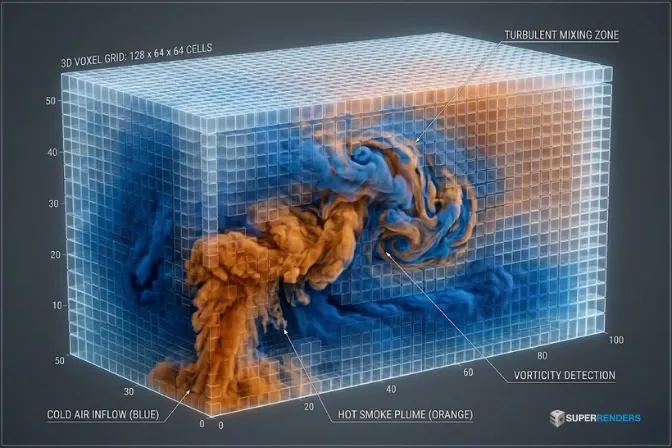 FumeFX voxel grid sistemi ile duman ve ateş simülasyonu
3.2 Voxel Boyutu: En Önemli Denge Noktası
Voxel boyutu, kalitenin performansla buluştuğu yerdir.
İşte gerçek dünyadaki denge:
- Küçük voxel → ayrıntılı, kıvrılan duman
- Büyük voxel → bloklu, daha hızlı sonuç
Ama burada önemli bir nokta var:
👉 Çoğu sanatçı voxel'in ne yaptığıyla uğraşmaz 👉 Asıl zorlandıkları, her şey bozulmadan onu ne kadar zorlayabilecekleridir
3.3 Adaptif Grid: Sadece Daha Büyük Değil, Daha Akıllı
Adaptif grid'ler çok pratik bir sorunu çözer:
👉 Boş alanı neden simüle edelim?
FumeFX, sabit bir kutu tutmak yerine:
- Simülasyonun bulunduğu yerde genişler
- Bulunmadığı yerde daralır
Bu özellikle patlamalarda faydalıdır, çünkü:
- Ateş hızla genişler
- Ardından dağılır
3.4 Sınırsız Simülasyon: Bedeli Olan Özgürlük
Sınırsız simülasyon, grid sınırlarını tamamen ortadan kaldırır.
Kulağa harika geliyor; ta ki çalıştırana kadar.
Çünkü artık:
- Simülasyon bir alanla sınırlı değil
- Kaynak kullanımı hızla artıyor
Sanatçıların ilk büyük performans duvarına çarptığı yer çoğu zaman burasıdır.
4. Ateş ve Duman: Gerçekçi Görünümü Gerçekte Ne Sağlar?
Ateş yaratmak kolaydır.
İnandırıcı ateş yaratmak ise işin zorlaştığı yerdir.
4.1 Ateş Sadece "Alevler" Değildir
FumeFX'te ateş şunların sonucudur:
- Yakıtın yanması
- Sıcaklığın yükselmesi
- Oksijenin etkileşime girmesi
Bu yüzden:
- Alevler titreşir
- Renkler sarıdan kırmızıya kayar
- Ateş öngörülemez biçimde davranır
4.2 Gerçekçiliğin Yaşadığı Yer Dumandır
Çoğu yeni başlayan ateşe odaklanır.
Profesyoneller ise dumana odaklanır.
Çünkü duman şunları ortaya koyar:
- Hareket kalitesini
- Ölçeği
- Fiziksel doğruluğu
İyi bir duman simülasyonu şunları içerir:
- Kaldırma kuvveti (doğal biçimde yükselme)
- Türbülans (düzgün hareketi bozma)
- Dağılma (gerçekçi biçimde sönümlenme)
4.3 Simülasyonların Çoğu Neden "Sahte" Görünür?
İşte gerçek:
👉 Çoğu FumeFX sonucu, yanlış ayarlar yüzünden sahte görünmez
👉 Eksik hareket karmaşıklığı yüzünden sahte görünür
Bu karmaşıklık şunlardan gelir:
- Doğru grid çözünürlüğü
- Dengeli türbülans
- Yeterli simülasyon süresi
5. FumeFX'i Render Etmek: Kalitenin Pahalıya Mal Olduğu Yer
Simülasyon size veri verir.
Rendering ise bu veriyi gözle görülebilir bir şeye dönüştürür.
5.1 Rendering Neden Ayrı Bir Zorluktur?
Simülasyonunuz kusursuz olsa bile:
- Kötü rendering = kötü sonuç
FumeFX'i render etmek şunları gerektirir:
- Doğru aydınlatma
- Uygun shading
- Yeterli sampling
5.2 V-Ray ve Arnold (Pratik Bir Bakış)
| Render Motoru | Güçlü Yön |
|---|---|
| V-Ray | Esnek, yaygın kullanılan |
| Arnold | Fiziksel olarak doğru, film prodüksiyonuna hazır |
İkisi de iyi çalışır; ancak her ikisi de ayar gerektirir.
5.3 Asıl Sorun: Gürültü ve Sampling
En yaygın sorunlardan biri:
👉 Volümetrik rendering'de gürültü
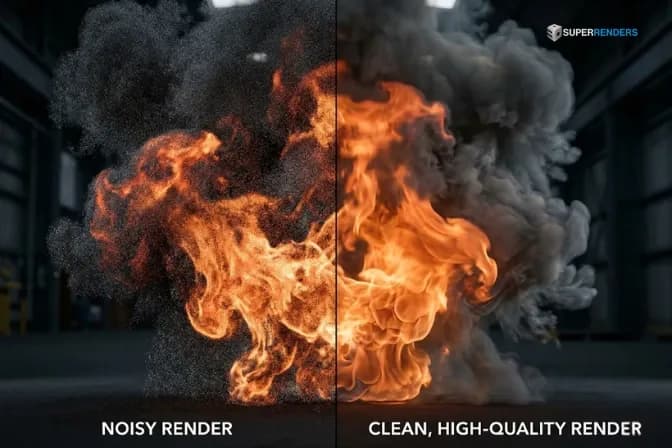 FumeFX render çıktısında gürültülü ve temiz volümetrik ateş rendering karşılaştırması
Gürültüyü gidermek şunları gerektirir:
- Daha yüksek sampling
- Daha küçük adım boyutu
Bu da şuna yol açar:
👉 Daha uzun render süreleri
6. Performansın Gerçeği (Çoğu Sanatçının Zorlandığı Yer)
Teorinin gerçeklikle buluştuğu yer burasıdır.
6.1 FumeFX Neden Bu Kadar Çabuk Yavaşlar?
Şunları artırdığınız anda:
- Grid boyutu
- Çözünürlük
Şunu fark edersiniz:
- Simülasyon süresi dramatik biçimde artar
Çünkü yalnızca detay eklemiyorsunuz; veriyi katlıyorsunuz.
6.2 Bellek ve Cache Patlaması
Büyük simülasyonlar:
- RAM'i hızla doldurur
- Devasa cache dosyaları üretir
Şu durum olağandışı değildir:
- Tek bir proje → onlarca GB
6.3 Kırılma Noktası
Her sanatçı, şu noktaya gelir:
- Simülasyon çok uzun sürer
- Rendering pratik olmaktan çıkar
Bu aşamada optimizasyon tek başına yeterli değildir.
7. İş Akışınızı Tek Bir Makinenin Ötesine Ölçeklendirmek
İş akışlarının değişmeye başladığı yer burasıdır.
7.1 Optimizasyonun Neden Sınırları Vardır?
Şunları yapabilirsiniz:
- Çözünürlüğü düşürmek
- Grid'leri ayarlamak
Ancak sonunda:
👉 Kaliteden fedakârlık edersiniz
7.2 Çözüm Olarak Dağıtık Rendering
Şunun yerine:
- Her şeyi tek bir makinenin yapması
Şunu kullanırsınız:
- Birlikte çalışan birden fazla makine
Bu sayede:
- Daha hızlı rendering
- Daha büyük simülasyonları işleyebilme
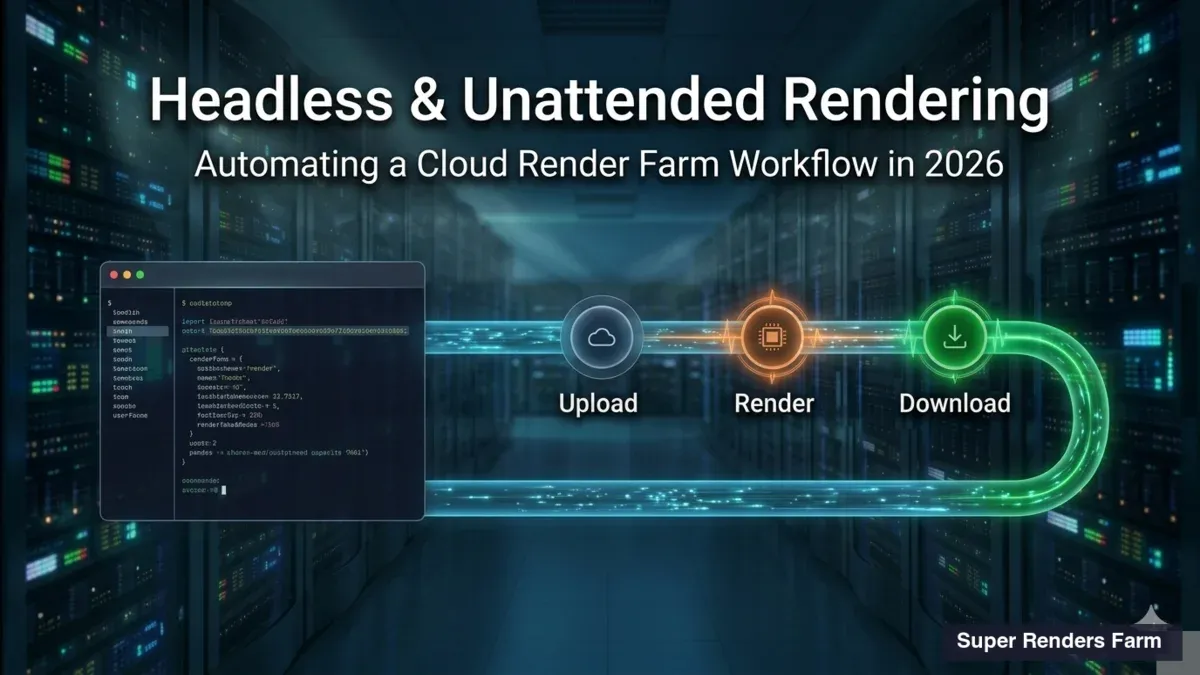
7.3 Sanatçılar İçin Pratik Bir Yaklaşım
Günümüzde birçok sanatçı:
- Testler için yerel olarak çalışıyor
- Final rendering için harici kaynakları kullanıyor
Örneğin Super Renders Farm bulut render hizmeti ile:
- Taahhütte bulunmadan önce rendering'i ücretsiz test edebilirsiniz * Gerektiğinde performansı ölçeklendirebilirsiniz
- Donanım sınırlamalarından kaçınabilirsiniz
Bu yaklaşım, yüksek ön yatırım gerektirmeden iş akışlarının esnek kalmasına yardımcı olur.
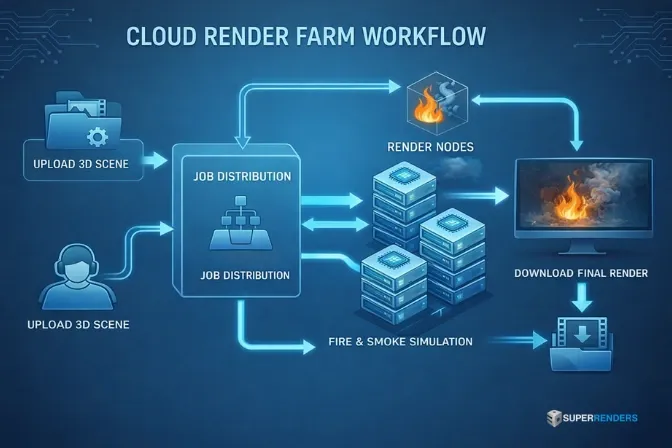 FumeFX ateş ve duman simülasyonu rendering'i için render farm iş akışı
8. FumeFX ve Diğer Araçlar: Doğru İş Akışını Seçmek
Hiçbir araç mükemmel değildir; yalnızca uygun olanlar vardır.
8.1 Hızlı Karşılaştırma
| Araç | En Uygun Kullanım |
|---|---|
| FumeFX | Kontrollü ateş ve duman |
| Phoenix FD | Daha hızlı kurulum |
| Houdini | Gelişmiş simülasyonlar |
| EmberGen | Gerçek zamanlı önizlemeler |
8.2 Pratik Bir Bakış
- Kontrol + gerçekçilik gerektiğinde FumeFX'i kullanın * Karmaşık sistemler gerektiğinde Houdini'yi kullanın * Hız için EmberGen'i kullanın
9. FumeFX'i Akıllıca Öğrenmek
Her şeyi aynı anda öğrenmeye çalışmak yerine:
- Temel simülasyonlarla başlayın
- Yalnızca görsellere değil, harekete odaklanın
- Tekrarlarla gelişin
Önerilen kaynak:
👉 https://docs.afterworks.com
10. FumeFX Eğitimi Hakkında SSS
FumeFX ne için kullanılır?
Ateş, duman ve patlama simülasyonu için.
Neden yavaş?
Voxel tabanlı volümetrik hesaplama nedeniyle.
Yeni başlayanlar öğrenebilir mi?
Evet, ancak simülasyon temellerinin anlaşılmasını gerektirir.
Hangi renderer en iyi sonucu verir?
V-Ray ve Arnold yaygın olarak kullanılır.
Ne zaman bir render farm kullanmalıyım?
Yerel makineniz simülasyonu veya rendering'i verimli biçimde işleyemediğinde.
FumeFX hâlâ güncel mi?
Evet, özellikle kontrollü sinematik efektler için.
11. Sonuç
Bu FumeFX eğitimi, yalnızca bir aracı öğrenmekle ilgili değildir; simülasyonun gerçek prodüksiyonda nasıl çalıştığını anlamakla ilgilidir.
Projeleriniz büyüdükçe zorluk, "nasıl oluşturulur" sorusundan şuna kayar:
👉 "nasıl verimli biçimde ölçeklendirilir"
Ve burada hem simülasyonu hem de iş akışı stratejisini anlamak kritik hale gelir.
About Thierry Marc
3D Rendering Expert with over 10 years of experience in the industry. Specialized in Maya, Arnold, and high-end technical workflows for film and advertising.