
Issue:
When opening 3ds Max a MAXScript error occurs indicating the following:

MAXScript MacroScript Error Exception
--Type error: Call needs function or class, got: undefined
Additionally, the MAXScript Editor opens with the following macro errors (or similar):

MAXScript Editor Window
"macroScript VRayViewportIPR
category: "VRay"
buttontext: "V-Ray IPR"
tooltip: "V-Ray Viewport IPR"

(
on isVisible do ( vrayViewportIPRControl 0 0 )
on isEnabled do ( vrayViewportIPRControl 0 1 )
on isChecked do ( vrayViewportIPRControl 0 2 )
on Execute do ( vrayViewportIPRControl 0 3 )
)"
Note: If more errors occur than can be displayed, the following error message may also appear:

Maximum Nested Error Dialog Depth Reached
Attempt to display more then maximum number of
simultaneous error message dialogs occurred.
See error log file for additional error messages
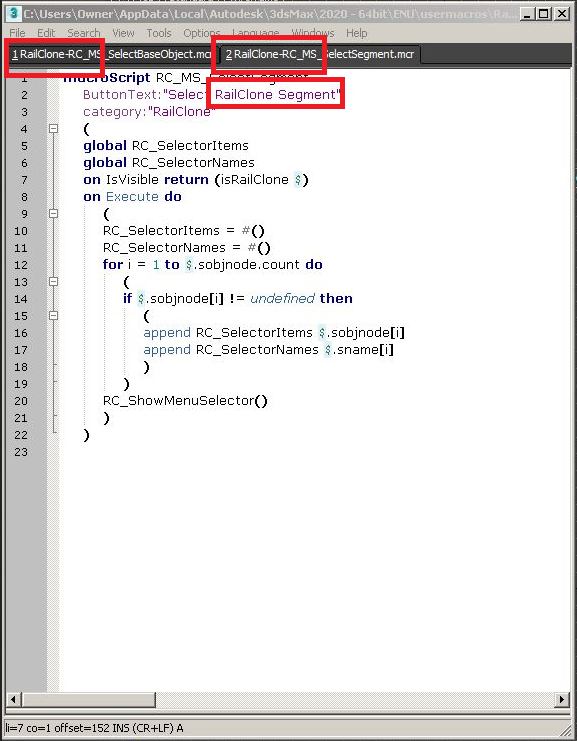
RailClone by iToo example:
Causes:
Corrupted plugin installation.
Solution:
Below is a collection of the most up-to-date solutions available. The list is not complete, and the final solution may require one, or a combination of the following:
- VRay: Perform a clean reinstall of V-Ray.
- RailClone: Perform a clean reinstall of RailClone.
Should the errors continue, it may be necessary to Perform a Clean Uninstall of 3ds Max.
See also:
- How To Export Redway RED Files From 3ds Max
- How To Render Point Clouds In 3ds Max 2018 And More Recent Versions
- Super Renders Farm– Powerfrl & Smart cloud render farm.
Source: https://autode.sk/32naEXC